|
||
| Products Download Events Support Videos | ||

Technical Support
On-Line Manuals
µVision User's Guide
 About µVision
User Interface
Creating Applications
About µVision
User Interface
Creating Applications
 Debugging
 Start Debugging
Start Energy Measurement without Debug
Application Program Execution
Debug Windows and Dialogs
Breakpoints Window
Call Stack and Locals Window
Code Coverage
Command Window
Component Viewer
Disassembly Window
Editor Window
Event Recorder
Setup Event Recorder
Event Recorder Window
Events Filtering
Event Statistics Window
Post-mortem Analysis
Event Viewer
Execution Profiler
Instruction Trace Window
System Analyzer
Usage tips
Save System Analyzer Contents
Statistics
Restrictions
Logic Analyzer
Setup
Setup in Detail
Restrictions
Cortex-M Trace Configuration
Memory Map
Memory Window
Performance Analyzer
Registers Window
Serial Window
Debug (printf) Viewer
Symbols Window
System Viewer
Adding System Viewer Windows
System and Thread Viewer
Thread States
Toolbox
Trace Data Window
Trace Navigation
Trace Exceptions
Event Counters
ULINKplus Window
Watch Window
Core Peripherals
Cortex-M0 and Cortex-M0+
CM0/M0+: Nested Vector Interrupt Controller
CM0/M0+: System Control and Configuration
CM0/M0+: System Tick Timer
Fault Reports (Cortex-M0+ only)
Cortex-M3, Cortex-M4, and Cortex-M7
CM3/M4/M7: Nested Vector Interrupt Controller
CM3/M4/M7: System Control and Configuration
CM3/M4/M7: System Tick Timer
CM3/M4/M7: Fault Reports
CM3/M4/M7: Memory Protection Unit
Cortex-M23/M33/M35P and Cortex-M55
Armv8-M: Nested Vector Interrupt Controller
Armv8-M: System Control and Configuration
Armv8-M: System Tick Timer
Armv8-M: Fault Reports
Armv8-M: Memory Protection Unit
Armv8-M: Security Attribution Unit
M-Profile Vector Extension (MVE)
Debug Scripting
Expressions
Constants
System Variables
Peripheral Variables
I/O Ports
Serial Ports
Program Variables (Symbols)
Fully Qualified Symbols
Non-Qualified Symbols
Literal Symbols
Using Symbols
Line Numbers
Bit Addresses
Type Specifications
Memory Attribution Specifiers
Operators
Differences between µVision and C
Expression Examples
Code and Data Trace (Cortex-M)
Trace Features
Configuring Trace
Tracepoint Expressions
Tracepoint Intrinsics
Tracepoint Limitations
Tracepoint Marks
Tips and Tricks
Review Peripherals and CPU Configuration
Simulate I/O Ports
Simulate Interrupts and Clock Inputs
Simulate external I/O Devices
Assign Serial I/O to a PC COM Port
Check Illegal Memory Access
Command Input from File
Preset I/O Ports or Memory Contents
Write Debug Output to a File
Keyboard Shortcuts
TPIU Initialization after RESET (Cortex-M)
Prevent Opening Files
Show Japanese Messages
Debug Commands
Debug Functions
Simulation
Flash Programming
Dialogs
Utilities
Command Line
Example Programs
Appendix
Start Debugging
Start Energy Measurement without Debug
Application Program Execution
Debug Windows and Dialogs
Breakpoints Window
Call Stack and Locals Window
Code Coverage
Command Window
Component Viewer
Disassembly Window
Editor Window
Event Recorder
Setup Event Recorder
Event Recorder Window
Events Filtering
Event Statistics Window
Post-mortem Analysis
Event Viewer
Execution Profiler
Instruction Trace Window
System Analyzer
Usage tips
Save System Analyzer Contents
Statistics
Restrictions
Logic Analyzer
Setup
Setup in Detail
Restrictions
Cortex-M Trace Configuration
Memory Map
Memory Window
Performance Analyzer
Registers Window
Serial Window
Debug (printf) Viewer
Symbols Window
System Viewer
Adding System Viewer Windows
System and Thread Viewer
Thread States
Toolbox
Trace Data Window
Trace Navigation
Trace Exceptions
Event Counters
ULINKplus Window
Watch Window
Core Peripherals
Cortex-M0 and Cortex-M0+
CM0/M0+: Nested Vector Interrupt Controller
CM0/M0+: System Control and Configuration
CM0/M0+: System Tick Timer
Fault Reports (Cortex-M0+ only)
Cortex-M3, Cortex-M4, and Cortex-M7
CM3/M4/M7: Nested Vector Interrupt Controller
CM3/M4/M7: System Control and Configuration
CM3/M4/M7: System Tick Timer
CM3/M4/M7: Fault Reports
CM3/M4/M7: Memory Protection Unit
Cortex-M23/M33/M35P and Cortex-M55
Armv8-M: Nested Vector Interrupt Controller
Armv8-M: System Control and Configuration
Armv8-M: System Tick Timer
Armv8-M: Fault Reports
Armv8-M: Memory Protection Unit
Armv8-M: Security Attribution Unit
M-Profile Vector Extension (MVE)
Debug Scripting
Expressions
Constants
System Variables
Peripheral Variables
I/O Ports
Serial Ports
Program Variables (Symbols)
Fully Qualified Symbols
Non-Qualified Symbols
Literal Symbols
Using Symbols
Line Numbers
Bit Addresses
Type Specifications
Memory Attribution Specifiers
Operators
Differences between µVision and C
Expression Examples
Code and Data Trace (Cortex-M)
Trace Features
Configuring Trace
Tracepoint Expressions
Tracepoint Intrinsics
Tracepoint Limitations
Tracepoint Marks
Tips and Tricks
Review Peripherals and CPU Configuration
Simulate I/O Ports
Simulate Interrupts and Clock Inputs
Simulate external I/O Devices
Assign Serial I/O to a PC COM Port
Check Illegal Memory Access
Command Input from File
Preset I/O Ports or Memory Contents
Write Debug Output to a File
Keyboard Shortcuts
TPIU Initialization after RESET (Cortex-M)
Prevent Opening Files
Show Japanese Messages
Debug Commands
Debug Functions
Simulation
Flash Programming
Dialogs
Utilities
Command Line
Example Programs
Appendix
Serial Window
The Serial window accepts serial input and output data streams. The window displays serial output data received from a simulated CPU, while characters typed into a serial window are input to the simulated CPU. This allows testing a UART interface prior to having the target hardware.
The Debug (printf) Viewer is a special serial window that can exchange data with the microcontoller. For Cortex-M microcontrollers, the window displays printf-data received from the Instrumentation Trace Macrocell (ITM). To redirect output, refer also to Retarget Output via ITM, and Debug Access in the CMSIS documentation.
 Open these windows using the toolbar button
or the menu View - Serial Windows.
Open these windows using the toolbar button
or the menu View - Serial Windows.
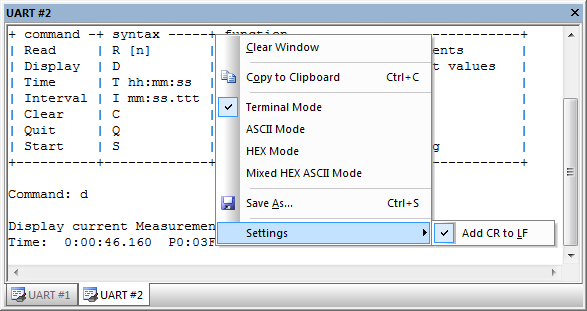
The Context Menu allows:
- Clearing the window.
- Copying and saving the content to the clipboard or a file.
- Setting a Carriage Return to every Line Feed that is received (enabled by default).
-
Switching to various representation modes.
Terminal Mode Text formatting and cursor control sequences are supported (see table below). ASCII Mode Every printable character is displayed. An unprintable character is displayed as white-space (' '). HEX Mode Every character is displayed as a HEX-number. Mixed Mode Every character is displayed as a HEX-number and ASCII character. An unprintable character is displayed as dot ('.').
ANSI VT100 Terminal Sequences
| Sequence | Description |
|---|---|
| From Target −→ µVision | |
| CR ('\r') | Carriage Return |
| LF ('\n') | Line Feed |
| TAB ('\t') | Tabulator |
| BS (0x08) | Back Space |
| BEL (0x07) | Bell |
| <ESC>[C | Move cursor (position) 1 to the right |
| <ESC>[D | Move cursor (position) 1 to the left |
| <ESC>[K | Delete line right to cursor |
| <ESC>[J | Clear screen |
| <ESC>[y;xf | Set cursor to Row y, Column x; (x,y) are numeric ASCII values |
| From µVision ⇒ Target | |
| <ESC>[A | Cursor Key UP |
| <ESC>[B | Cursor Key DOWN |
| <ESC>[C | Cursor Key RIGHT |
| <ESC>[D | Cursor Key LEFT |
Examples
// Clear screen and set cursor home
void ClearScreen(void)
{
        printf("%c[1;1f%c[J", 27, 27);
}

// set cursor to position (x, y)
void SetCursorPosition(int x, int y)
{
        printf("%c[%i;%if", 27, (signed int)y, (signed int)x);
}
See also
- Assign Serial I/O to a PC COM Port using the debug command ASSIGN.
- SLOG the debug command to redirect serial output to a file.
- UART Communication provides examples of UART simulation, peripheral dialogs, VTREG's, or controlling UART communication timing.
- Debug (printf) Viewer usage when debugging hardware with ULINKpro.
ProductsDevelopment Tools |
Hardware & Collateral |
Downloads |
Support |
Contact |
 |
||||