|
||
| Products Download Events Support Videos | ||

Technical Support
On-Line Manuals
RL-ARM User's Guide (MDK v4)
 RL-RTX
RL-FlashFS
RL-TCPnet
RL-RTX
RL-FlashFS
RL-TCPnet
 RL-CAN
 Overview
Features
Source Files
Function Overview
Initialization Routines
Message Reception Routines
Message Transmission Routines
Errors
Hardware Configuration
NXP LPC17xx Devices
Configuration
NXP LPC21xx Devices
Configuration
Getting Started
Simulation
NXP LPC229x Devices
Configuration
NXP LPC23xx Devices
Configuration
NXP LPC24xx Devices
Configuration
NXP LPC29xx Devices
Configuration
ST STM32F103 Devices
Configuration
Getting Started
Simulation
ST STM32F105/7 Devices
Configuration
ST STR71x Devices
Configuration
Getting Started
Simulation
ST STR73x Devices
Configuration
Getting Started
Simulation
ST STR91x Devices
Configuration
Getting Started
Toshiba TMPM36x Devices
Configuration
Getting Started
Luminary LM3Sxxxx Devices
Configuration
Atmel AT91SAM7X Devices
Hardware Configuration
Getting Started
Initialization
Example Projects
RL-USB
Example Programs
Library Reference
Appendix
Overview
Features
Source Files
Function Overview
Initialization Routines
Message Reception Routines
Message Transmission Routines
Errors
Hardware Configuration
NXP LPC17xx Devices
Configuration
NXP LPC21xx Devices
Configuration
Getting Started
Simulation
NXP LPC229x Devices
Configuration
NXP LPC23xx Devices
Configuration
NXP LPC24xx Devices
Configuration
NXP LPC29xx Devices
Configuration
ST STM32F103 Devices
Configuration
Getting Started
Simulation
ST STM32F105/7 Devices
Configuration
ST STR71x Devices
Configuration
Getting Started
Simulation
ST STR73x Devices
Configuration
Getting Started
Simulation
ST STR91x Devices
Configuration
Getting Started
Toshiba TMPM36x Devices
Configuration
Getting Started
Luminary LM3Sxxxx Devices
Configuration
Atmel AT91SAM7X Devices
Hardware Configuration
Getting Started
Initialization
Example Projects
RL-USB
Example Programs
Library Reference
Appendix


 Configuration
CAN Hardware Configuration
The following symbols specify CAN Hardware Configuration related parameters and are located in CAN_LPC229x.c file:
-
PCLK (Peripheral CLocK) constant is
used to calculate the correct communication speed (baudrate). The
value of this constant must be calculated manually and is
dependent on VPBDIV and MSEL settings in the Startup file. The
value is equal to VPB Clock.
#define PCLK 60000000 /* VPB Clock = CPU Clock, MSEL = 5, xtal = 12 MHz, CPU Clock = 60 MHz (MSEL * xtal) */ -
VIC_NUM_CTRL1_TX .. VIC_NUM_CTRL4_TX specifies which
vectored interrupt number to use for message transmission.
Since transmission is interrupt driven, it is necessary to define unique numbers of interrupts used for each controller's transmission. Acceptable values are 0 .. 15. The lower values have a higher priority.
#define VIC_NUM_CTRL1_TX 11
-
VIC_NUM_CTRL1_RX .. VIC_NUM_CTRL4_RX specifies which
vectored interrupt number is going to be used for message
reception.
Since reception is interrupt driven, it is necessary to define unique numbers of interrupts used for each controller's reception. Acceptable values are 0 .. 15. The lower values have a higher priority.
#define VIC_NUM_CTRL1_RX 7
CAN Generic Configuration
The following symbols specify CAN Generic Configuration related parameters and are located in CAN_Cfg.h file:
-
USE_CAN_CTRL1 .. USE_CAN_CTRL4 enables the CAN controller
that will be used. To enable the CAN controller, set this value
to 1.
The RL-CAN uses this information to reserve the memory pool and the memory for software FIFO buffers, as well as to enable interrupts for handling transmission and reception of CAN messages on the specified CAN controller.
#define USE_CAN_CTRL1           1
#define USE_CAN_CTRL2           1
#define USE_CAN_CTRL3           0
#define USE_CAN_CTRL4           0
-
CAN_No_SendObjects specifies the size of the software
message FIFO buffers for message sending. Each CAN controller
reserves a specified size of software buffer to send messages.
#define CAN_No_SendObjects 20
-
CAN_No_ReceiveObjects specifies the size of the software
message FIFO buffers for message reception. Each CAN controller
reserves a specified size of software buffer to receive messages.
#define CAN_No_ReceiveObjects 20
Using Configuration Wizard
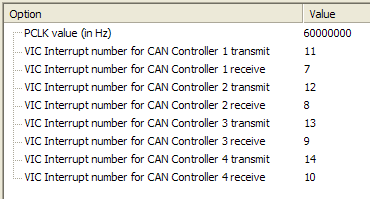
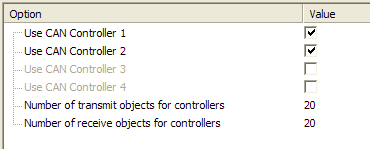
You can use the Configuration Wizard to select the parameters as shown in the picture below.
File CAN_LPC229x.c edited with Configuration Wizard:
File CAN_Cfg.h edited with Configuration Wizard:
ProductsDevelopment Tools |
Hardware & Collateral |
Downloads |
Support |
Contact |
 |
||||