|
||
| Products Download Events Support Videos | ||

Technical Support
On-Line Manuals
RL-ARM User's Guide (MDK v4)
 RL-RTX
 RL-FlashFS
 Technical Data
NAND Flash Translation Layer
Embedded File System
Memory Organization
Allocation Information
File Data Fragments
Limitations
Configuring RL-FlashFS
Source Files
Configuration Options
File System
Flash Drive
SPI Flash Drive
RAM Drive
Memory Card Drive
USB Flash Drive
NAND Flash Drive
Using RL-FlashFS
Using Flash Devices
Flash Driver
Sector Layout
Converting FlashPrg.c
Converting FlashDev.c
Limitations When Using Internal Flash
Using SPI Flash Devices
SPI Flash Driver
SPI Sector Layout
Using RAM Devices
Using Memory Card Devices
MCI Driver
SPI Driver
Using FlashFS with USB Devices
FAT Driver
Using NAND Devices
NAND Driver
NAND Page Data Layout
Function Overview
File I/O Routines
File Maintenance Routines
File Time Support Routines
Flash Driver Routines
FAT Driver Routines
MCI Driver Routines
SPI Driver Routines
NAND Driver Routines
IOC Interface Routines
System Routines
RL-TCPnet
RL-CAN
RL-USB
Example Programs
Library Reference
Appendix
Technical Data
NAND Flash Translation Layer
Embedded File System
Memory Organization
Allocation Information
File Data Fragments
Limitations
Configuring RL-FlashFS
Source Files
Configuration Options
File System
Flash Drive
SPI Flash Drive
RAM Drive
Memory Card Drive
USB Flash Drive
NAND Flash Drive
Using RL-FlashFS
Using Flash Devices
Flash Driver
Sector Layout
Converting FlashPrg.c
Converting FlashDev.c
Limitations When Using Internal Flash
Using SPI Flash Devices
SPI Flash Driver
SPI Sector Layout
Using RAM Devices
Using Memory Card Devices
MCI Driver
SPI Driver
Using FlashFS with USB Devices
FAT Driver
Using NAND Devices
NAND Driver
NAND Page Data Layout
Function Overview
File I/O Routines
File Maintenance Routines
File Time Support Routines
Flash Driver Routines
FAT Driver Routines
MCI Driver Routines
SPI Driver Routines
NAND Driver Routines
IOC Interface Routines
System Routines
RL-TCPnet
RL-CAN
RL-USB
Example Programs
Library Reference
Appendix
RL-FlashFS
RL-Flash File System (RL-FlashFS) is a software library that provides a common API to create, save, read, and modify files on a Flash device. The library offers interface functions and handles the low level file input and output operations. Developer can focus on the application needs rather than concerning about the implemented file system. RL-FlashFS works with several ARM- and Cortex-M processor-based devices, and can be used standalone or with the RTX-RTOS. RL-FlashFS applications are written using standard C constructs and are compiled with the ARM Compiler.
RL-FlashFS supports several media types, such as standard Secure Digital (SD), Secure Digital High Capacity (SDHC), Multi Media Card (MMC), and Flash Memory Cards. Flash File System Features lists the RL-FlashFS characteristics.
The picture below relates the media types to the file system supported by RL-FlashFS.
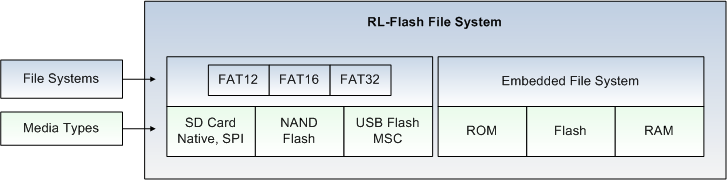
The file system depends on the memory device type used in the application and is selected automatically by RL-FlashFS. The following file systems are supported:
- FAT File System
- Supports the FAT12, FAT16, and FAT32 file system. This file system is used for memory card devices (SD Cards), USB Memory sticks, and NAND Flash devices. RL-FlashFS provides a NAND Flash Translation Layer for wear leveling, bad block management, and error correction.
- Embedded File System
- Is optimized for low density Flash devices (NOR Flash), SPI Flash, and RAM devices.
This chapter contains the following sections:
- Technical Data
- Providing an overview about the RL-FlashFS performance on various boards.
- Configuring RL-FlashFS
- Explaining the configuration options for the supported media types.
- Using RL-FlashFS
- Explaining the creation of applications using RL-FlashFS.
- Function Overview
- Describing the functions and routines provided by RL-FlashFS.
ProductsDevelopment Tools |
Hardware & Collateral |
Downloads |
Support |
Contact |
 |
||||