|
||
| Products Download Events Support Videos | ||

Technical Support
On-Line Manuals
RL-ARM User's Guide (MDK v4)
 RL-RTX
 RL-FlashFS
 Technical Data
NAND Flash Translation Layer
Embedded File System
Memory Organization
Allocation Information
File Data Fragments
Limitations
Configuring RL-FlashFS
Source Files
Configuration Options
File System
Flash Drive
SPI Flash Drive
RAM Drive
Memory Card Drive
USB Flash Drive
NAND Flash Drive
Using RL-FlashFS
Using Flash Devices
Flash Driver
Sector Layout
Converting FlashPrg.c
Converting FlashDev.c
Limitations When Using Internal Flash
Using SPI Flash Devices
SPI Flash Driver
SPI Sector Layout
Using RAM Devices
Using Memory Card Devices
MCI Driver
SPI Driver
Using FlashFS with USB Devices
FAT Driver
Using NAND Devices
NAND Driver
NAND Page Data Layout
Function Overview
File I/O Routines
File Maintenance Routines
File Time Support Routines
Flash Driver Routines
FAT Driver Routines
MCI Driver Routines
SPI Driver Routines
NAND Driver Routines
IOC Interface Routines
System Routines
RL-TCPnet
RL-CAN
RL-USB
Example Programs
Library Reference
Appendix
Technical Data
NAND Flash Translation Layer
Embedded File System
Memory Organization
Allocation Information
File Data Fragments
Limitations
Configuring RL-FlashFS
Source Files
Configuration Options
File System
Flash Drive
SPI Flash Drive
RAM Drive
Memory Card Drive
USB Flash Drive
NAND Flash Drive
Using RL-FlashFS
Using Flash Devices
Flash Driver
Sector Layout
Converting FlashPrg.c
Converting FlashDev.c
Limitations When Using Internal Flash
Using SPI Flash Devices
SPI Flash Driver
SPI Sector Layout
Using RAM Devices
Using Memory Card Devices
MCI Driver
SPI Driver
Using FlashFS with USB Devices
FAT Driver
Using NAND Devices
NAND Driver
NAND Page Data Layout
Function Overview
File I/O Routines
File Maintenance Routines
File Time Support Routines
Flash Driver Routines
FAT Driver Routines
MCI Driver Routines
SPI Driver Routines
NAND Driver Routines
IOC Interface Routines
System Routines
RL-TCPnet
RL-CAN
RL-USB
Example Programs
Library Reference
Appendix


 USB Flash Drive
USB Flash Drive options allow configuring RL-FlashFS to use USB Flash devices. Set the options manually or use the Configuration Wizard.
RL-FlashFS supports two USB Flash drives. Identical options exist for both drives and can operate at the same time.
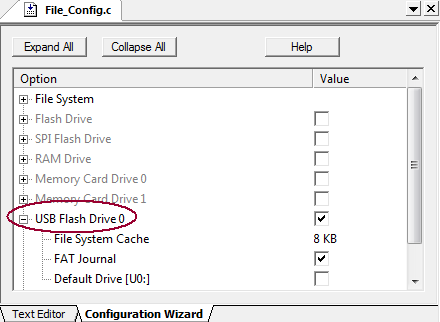
To following options can be set:
-
USB Flash Drive 0 enables support for Mass Storage device.
#define USB0_EN 1 // 0=disable; 1=enable
-
File System Cache enables or disables data caching and
specifies the cache buffer size in KBytes. Data caching might
increase the file r/w speed several times. Turn off data caching
if the application is low on memory and the file read/write speed
is not important.
#define USB0_CASZ 8
-
FAT Journal protects the file system from a potential
damage during power failure and keeps the system in a consistent
state. This option does not protect files that are written during
power failure.
#define USB0_FSJ 1 // 0=disable; 1=enable
-
Default Drive [U0:] enables the USB Flash Drive 0 as a
default system drive. This drive is used, when a drive letter is
not specified in a file name. The drive label U is
considered as U0.
#define USB0_DEF 1 // 0=disable; 1=enable
ProductsDevelopment Tools |
Hardware & Collateral |
Downloads |
Support |
Contact |
 |
||||