|
||
| Products Download Events Support Videos | ||

Technical Support
On-Line Manuals
µVision User's Guide
 About µVision
 User Interface
 µVision GUI
Docking Windows
Using the Editor
Context Menu
Configuring the Editor
Code Completion
Dynamic Syntax Checking
Marks in the Editor Margin
File Menu and Commands
Edit Menu and Commands
Bookmarks
Outlining Menu
Advanced Menu
View Menu
Status Bar
Project Window
Books Window
Manage Books
Functions Window
Templates Window
Source Browser Window
Build Output Window
Error List Window
Find in Files Window
Analysis Menu
Trace Menu
Project Menu and Commands
Import
Export Menu
Manage Menu
Flash Menu
Debug Menu and Commands
OS Support Menu
Execution Profiling Menu
Peripherals Menu
Tools Menu
SVCS Menu
Window Menu
Help Menu
Creating Applications
Debugging
Debug Commands
Debug Functions
Simulation
Flash Programming
Dialogs
Utilities
Command Line
Example Programs
Appendix
µVision GUI
Docking Windows
Using the Editor
Context Menu
Configuring the Editor
Code Completion
Dynamic Syntax Checking
Marks in the Editor Margin
File Menu and Commands
Edit Menu and Commands
Bookmarks
Outlining Menu
Advanced Menu
View Menu
Status Bar
Project Window
Books Window
Manage Books
Functions Window
Templates Window
Source Browser Window
Build Output Window
Error List Window
Find in Files Window
Analysis Menu
Trace Menu
Project Menu and Commands
Import
Export Menu
Manage Menu
Flash Menu
Debug Menu and Commands
OS Support Menu
Execution Profiling Menu
Peripherals Menu
Tools Menu
SVCS Menu
Window Menu
Help Menu
Creating Applications
Debugging
Debug Commands
Debug Functions
Simulation
Flash Programming
Dialogs
Utilities
Command Line
Example Programs
Appendix
Source Browser Window
The Source Browser displays program symbols and the place of their occurrence. Browse information can be viewed in Build Mode and Debug Mode.
Note
- Browse information is based on case-sensitive file names and paths.
- Enable Options for Target — Output – Browse Information and compile the source code to activate program symbols.
- Using Arm Compiler 6 in a project, source browse information is created on-the-fly when opening the project. Once finished, updates are by default triggered while the source code is edited. See configuration options in section Source Browser Information (AC6) in Text Completion.
 Go to View — Source Browser Window
to open the window.
Go to View — Source Browser Window
to open the window.
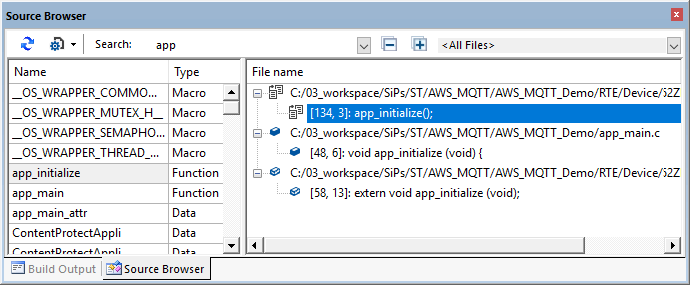
Filter options allow you to narrow the browse information.
Where
 |
Refresh | Search for browse information and refresh the information the window. |
 |
Type filter |
Select the browse information type. You can combine the
following symbol types:
|
| Search | Enter a string to narrow the information. Press enter to execute the search. | |
 |
Collapse | Contract expanded records in the column File name. |
 |
Expand | Expand all records in the column File name. |
| <All Files> | Narrow the search to the selected file. |
The window shows:
| Name | The symbol name. |
| Type | The symbol type as defined in the code. |
| File name | The file name in which the symbol occurs. Double-click a row to jump to the code. |
Icons in the row identify the nature of the symbol:
-
 Location of
the symbol definition.
Location of
the symbol definition.
-
 Locations of the symbol definition and reference(s).
-
 Location(s)
of the symbol declaration(s).
Location(s)
of the symbol declaration(s).
-
 Locations of the symbol declaration(s) and reference(s).
-
 Location(s)
of the symbol reference(s).
Location(s)
of the symbol reference(s).
Shortcut Keys
Browse information can be accessed directly in the editor through the following shortcut keys. Position the cursor above a symbol and press:
| Shortcut Key | Description |
|---|---|
| Shift+Alt+F12 | Refresh Source Browser View. Use this to update the window once a recreation of the browse information as started when editing a file. |
| F12 | Goto definition. |
| Ctrl+F12 | Goto declaration. |
| Ctrl+Num+ | Goto next reference or definition. |
| Ctrl+Num– | Goto previous reference or definition. |
| Ctrl+Shift+F12 | Show All References. |
ProductsDevelopment Tools |
Hardware & Collateral |
Downloads |
Support |
Contact |
 |
||||