|
||
| Products Download Events Support Videos | ||

Technical Support
On-Line Manuals
µVision3 User's Guide
 µVision3 Overview
User Interface
Creating Applications
Utilities
µVision3 Overview
User Interface
Creating Applications
Utilities
 Debugging
Using the Debugger
Debugging
Using the Debugger
 CPU Simulation
Start Debugging
Application Program Execution
Debug Windows and Dialogs
Breakpoints
Code Coverage
CPU Registers
Disassembly Window
Logic Analyzer
Setup
Setup in Detail
Restrictions
Memory Window
Memory Map
Output Window - Command
Debug Commands
Variables and Registers
Debug Functions
Execution Profiler
Performance Analyzer
Serial Window
Symbol Window
Toolbox
Watch Window
Expressions
Constants
System Variables
Peripheral Variables
I/O Ports
Serial Ports
Program Variables (Symbols)
Line Numbers
Bit Addresses
Type Specifications
Operators
Differences Between µVision3 and C
Expression Examples
Tips and Tricks
Review Peripherals and CPU Configuration
Simulate I/O Ports
Simulate Interrupts and Clock Inputs
Simulate external I/O Devices
Assign Serial I/O to a PC COM Port
Check Illegal Memory Accesses
Command Input from File
Preset I/O Ports or Memory Contents
Write Debug Output to a File
Keyboard Shortcuts
Debug Commands
Debug Functions
Simulation
Flash Programming
Dialogs
Example Programs
Command Line
Appendix
CPU Simulation
Start Debugging
Application Program Execution
Debug Windows and Dialogs
Breakpoints
Code Coverage
CPU Registers
Disassembly Window
Logic Analyzer
Setup
Setup in Detail
Restrictions
Memory Window
Memory Map
Output Window - Command
Debug Commands
Variables and Registers
Debug Functions
Execution Profiler
Performance Analyzer
Serial Window
Symbol Window
Toolbox
Watch Window
Expressions
Constants
System Variables
Peripheral Variables
I/O Ports
Serial Ports
Program Variables (Symbols)
Line Numbers
Bit Addresses
Type Specifications
Operators
Differences Between µVision3 and C
Expression Examples
Tips and Tricks
Review Peripherals and CPU Configuration
Simulate I/O Ports
Simulate Interrupts and Clock Inputs
Simulate external I/O Devices
Assign Serial I/O to a PC COM Port
Check Illegal Memory Accesses
Command Input from File
Preset I/O Ports or Memory Contents
Write Debug Output to a File
Keyboard Shortcuts
Debug Commands
Debug Functions
Simulation
Flash Programming
Dialogs
Example Programs
Command Line
Appendix


 Start Debugging
 The µVision3 Debug Mode starts with the menu
command Debug — Start/Stop Debug Session. Depending on
settings under Options for Target —
Debug, the µVision3 Debugger loads the application program
and executes the startup code.
The µVision3 Debug Mode starts with the menu
command Debug — Start/Stop Debug Session. Depending on
settings under Options for Target —
Debug, the µVision3 Debugger loads the application program
and executes the startup code.
µVision3 saves the editor screen layout and restores the screen layout of the last debug session. If the program execution stops, µVision3 opens an editor window with the source text or shows CPU instructions in the disassembly window.
 The current instruction or high-level
statement (the one about to execute) is marked with a yellow arrow.
Each time you step, the arrow moves to reflect the new current line
or instruction.
The current instruction or high-level
statement (the one about to execute) is marked with a yellow arrow.
Each time you step, the arrow moves to reflect the new current line
or instruction.
The following screen is what you can expect when you start the debugger.
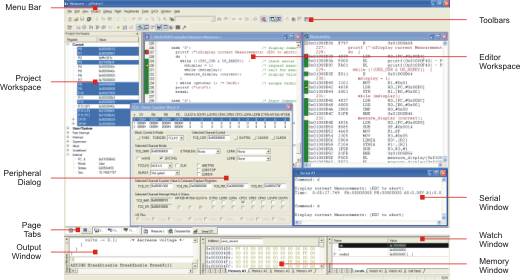
During debugging, most editor features are still available. For example, you can use the find command or correct program errors. Program source text of your application is shown in the same windows.
The µVision3 debug mode differs from the edit mode in the following aspects:
- The Debug Menu and Debug Commands are available. The additional Debug Windows and Dialogs are discussed in the following.
- The project structure or tool parameters cannot be modified. All build commands are disabled.
ProductsDevelopment Tools |
Hardware & Collateral |
Downloads |
Support |
Contact |
 |
||||