|
||
| Products Download Events Support Videos | ||

Technical Support
On-Line Manuals
RL-ARM User's Guide (MDK v4)
 RL-RTX
RL-FlashFS
RL-TCPnet
RL-CAN
RL-USB
RL-RTX
RL-FlashFS
RL-TCPnet
RL-CAN
RL-USB
 Example Programs
 RTX_ex1
Traffic Example
SD_File
MSD_File
File_ex1
HTTP_demo
Telnet_demo
TFTP_demo
Library Reference
Appendix
RTX_ex1
Traffic Example
SD_File
MSD_File
File_ex1
HTTP_demo
Telnet_demo
TFTP_demo
Library Reference
Appendix


 Telnet_demo
The Telnet_demo example program shows the use of an Telnet Server to control an embedded system. The application runs in the Local Area Network (LAN). Example projects are located in the folder \ARM\Boards\vendor\board\RL\TCPnet.
Network Configuration
Specify network parameters like IP Address, Subnet Mask, Default Gateway, and Primary DNS Server IP address in the section Ethernet Network Interface of the file Net_Config.c. To configure the parameters:
- Automatically: enable the option Dynamic Host Configuration (#define DHCP_ENABLE 1). A DHCP Server must exist in the LAN to provide the parameter values for the embedded system.
- Statically: enter the parameter values manually. Disable the option Dynamic Host Configuration (#define DHCP_ENABLE 0). Specify a free IP address and copy the netmask from the LAN configuration. A DNS Server IP address is not necessary for this example and can be left at 0.0.0.0.
Testing the Telnt_demo
The project includes two targets:
- MCB2300: configures the application for the production environment.
- MCB2300 Debug: configures the application to display debugging information as specified in the file Net_Debug.c.
Test the application with a TELNET Client program.
- Connect ULINK to the PC and to the board.
- Build the application.
- Download the application to Flash.
- Connect the board to the LAN.
-
Open the Command Prompt and enter the following command to test
the connection:
ping mcb2300
On a positive result, use the commands described in the table below to communicate with the target system. The host name mcb2300 is defined in the file Net_Config.c as described in System Definitions.
-
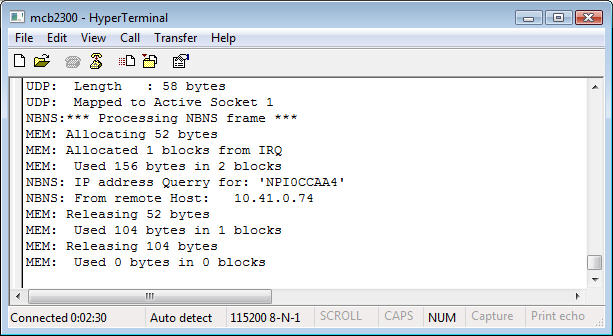
To view the debugging information, open a terminal emulation
program (for example, HyperTerminal) with the following
characteristics:
- COM Port: COM1.
- Baud rate: 115200.
- Data bits: 8.
- Parity: None.
- Stop bits: 1.
- Flow control: None.
The following commands can be used:
| Command | Description |
|---|---|
| led xx | Write the hex value xx to the LED port to switch the LED diodes on and off. |
| led | Re-enable the running lights that were stopped by the previous led xx command. |
| adin x | Read the Analog-to-Digital converter input x. The range for x is from 0 to 7. |
| meas n | Display n measurements. A measurement is a sampled analog input. |
| rinfo | Display the remote machine's IP and MAC address. |
| tcpstat | Display the TCP status. This page is continuously updated. |
| passw newp | Change the system login password to the new password newp. |
| passwd | Display the current password. |
| help ? |
Display command help. |
| bye <ESC> |
Disconnect the telnet connection. |
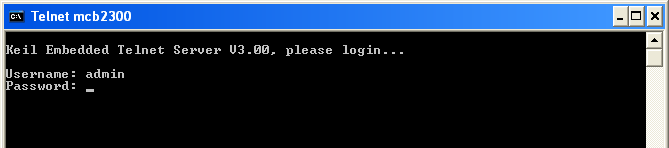
By default, user authentication is enabled requiring login credentials. The default username is admin with no password. Press enter to connect.
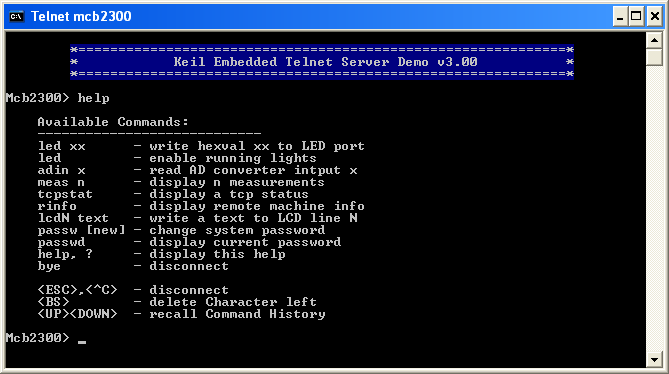
Check the integrated commands with the help command.
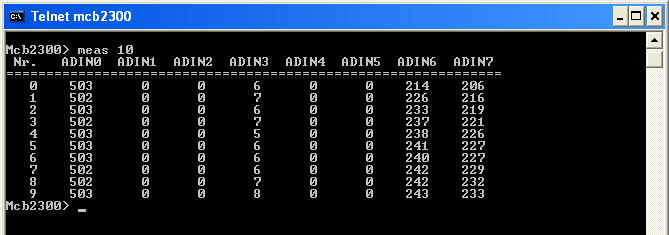
Use the command meas to sample analog inputs and to display the result. The command example below, meas 10, shows 10 measurements.
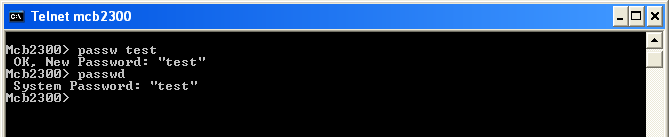
Display the current password with the command passwd.
Define a new password with the command passw.
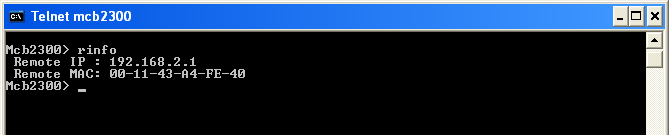
Check the remote machine's IP and MAC address with the command rinfo.
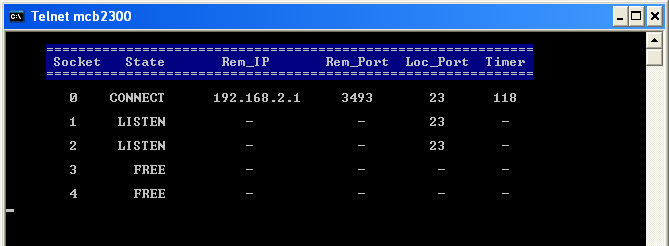
Monitor the status of the TCP socket with the command tcpstat. The values are updated continuously.
 Note
Note
- Windows operating systems include a TELNET Client program, however, it might need enabling.
ProductsDevelopment Tools |
Hardware & Collateral |
Downloads |
Support |
Contact |
 |
||||