|
||
| Products Download Events Support Videos | ||

Technical Support
On-Line Manuals
RL-ARM User's Guide (MDK v4)
 RL-RTX
Overview
RL-RTX
Overview
 Product Description
Product Specification
Technical Data
Timing Specifications
Advantages
Your First RTX Application
Theory of Operation
Timer Tick Interrupt
System Task Manager
Task Management
Idle Task
System Resources
Scheduling Options
Pre-emptive Scheduling
Round-Robin Scheduling
Cooperative Multitasking
Priority Inversion
Stack Management
User Timers
Interrupt Functions
Configuring RL-RTX
Configuration Options
Tasks
Stack Size
Stack Checking
Run in Privileged Mode
Hardware Timer
Round-Robin Multitasking
User Timers
FIFO Queue Buffer
Idle Task
Error Function
Create New RTX_Config.c
Configuration Macros
Alternate Tick Timer
Low Power RTX
Library Files
Using RL-RTX
Writing Programs
Include Files
Defining Tasks
Multiple Instances
External References
Using a Mailbox
SWI Functions
SVC Functions
Debugging
System Info
Task Info
Event Viewer
Usage Hints
ARM7/ARM9 Version
Cortex-M Version
Create New RTX Application
Function Reference
Event Flag Management Routines
Mailbox Management Routines
Memory Allocation Routines
Mutex Management Routines
Semaphore Management Routines
System Functions
Task Management Routines
Time Management Routines
User Timer Management Routines
Product Description
Product Specification
Technical Data
Timing Specifications
Advantages
Your First RTX Application
Theory of Operation
Timer Tick Interrupt
System Task Manager
Task Management
Idle Task
System Resources
Scheduling Options
Pre-emptive Scheduling
Round-Robin Scheduling
Cooperative Multitasking
Priority Inversion
Stack Management
User Timers
Interrupt Functions
Configuring RL-RTX
Configuration Options
Tasks
Stack Size
Stack Checking
Run in Privileged Mode
Hardware Timer
Round-Robin Multitasking
User Timers
FIFO Queue Buffer
Idle Task
Error Function
Create New RTX_Config.c
Configuration Macros
Alternate Tick Timer
Low Power RTX
Library Files
Using RL-RTX
Writing Programs
Include Files
Defining Tasks
Multiple Instances
External References
Using a Mailbox
SWI Functions
SVC Functions
Debugging
System Info
Task Info
Event Viewer
Usage Hints
ARM7/ARM9 Version
Cortex-M Version
Create New RTX Application
Function Reference
Event Flag Management Routines
Mailbox Management Routines
Memory Allocation Routines
Mutex Management Routines
Semaphore Management Routines
System Functions
Task Management Routines
Time Management Routines
User Timer Management Routines
 RL-FlashFS
RL-TCPnet
RL-CAN
RL-USB
Example Programs
Library Reference
Appendix
RL-FlashFS
RL-TCPnet
RL-CAN
RL-USB
Example Programs
Library Reference
Appendix
Task Info
Detailed information about each running task is displayed when you expand the Tasks property in the RTX Tasks and System dialog. Note that one task can run in multiple instances. All active tasks are listed in this dialog.
Select RTX Tasks and System from the OS Support item in the Debug menu to display this dialog.
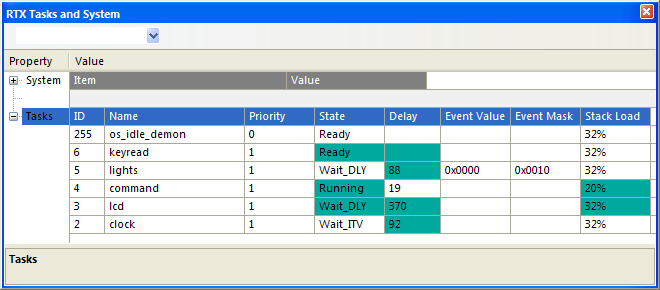
- ID is the Task Identification Value assigned when the task was started.
- Name is the name of the task function.
- Priority is the current task priority.
- State is the current state of the task.
- Delay is the delay timeout value for the task.
- Event Value specifies the event flags set for the task.
- Event Mask specifies the event flags mask for the events that the task is waiting for.
- Stack Load specifies the usage of the task's stack.
ProductsDevelopment Tools |
Hardware & Collateral |
Downloads |
Support |
Contact |
 |
||||