|
||
| Products Download Events Support Videos | ||

Technical Support
On-Line Manuals
ULINK-ME User's Guide
 Introduction
Hardware Description
Setting Up and Using ULINK-ME
Configure Cortex-M Devices for Tracing
Introduction
Hardware Description
Setting Up and Using ULINK-ME
Configure Cortex-M Devices for Tracing
Flash Download Configuration
µVision uses a target driver to connect to and control Flash downloading. For downloading to Flash, select Use Target Driver for Flash Programming from the Options for Target — Utilities dialog.
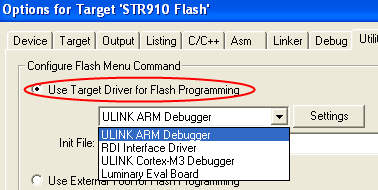
In general, you must choose the driver that matches your In-Circuit Emulator (ICE) or target debugger from the drop-down list. When using ULINK-ME, select the appropriate ULINK driver for your target hardware.
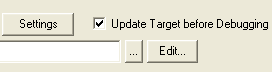 Check the
Update Target before Debugging option to ensure that the Flash
ROM gets programmed whenever the debugger starts.
Check the
Update Target before Debugging option to ensure that the Flash
ROM gets programmed whenever the debugger starts.
Click the Settings button to display the Flash Download Setup dialog.
The Flash Download Setup dialog consists of three groups of configuration settings:
ProductsDevelopment Tools |
Hardware & Collateral |
Downloads |
Support |
Contact |
 |
||||