|
||
| Products Download Events Support Videos | ||

Technical Support
On-Line Manuals
µVision3 User's Guide
 µVision3 Overview
User Interface
µVision3 Overview
User Interface
 Creating Applications
Create Project
Creating Applications
Create Project
 Selecting the Toolset
Create Project File and Select CPU
Project Workspace — Books
Create New Source Files
Add Source Files to Project
Create File Groups
Setting Tool Options
Configure Startup Code
Build Project
Create HEX File
Project Targets and File Groups
View File and Group Attributes
Overview of Configuration Dialogs
Tips and Tricks
Start External Tools after Build Process
Folders for Listing and Object Files
Custom and New Devices
Create a Library File
File and Group Specific Options
File Extensions
Importing µVision 1 Projects
Version and Serial Number Information
Including Library Modules
Use a Custom Translator
Different Compiler and Assembler Settings
Utilities
Debugging
Debug Commands
Debug Functions
Simulation
Flash Programming
Dialogs
Example Programs
Command Line
Appendix
Selecting the Toolset
Create Project File and Select CPU
Project Workspace — Books
Create New Source Files
Add Source Files to Project
Create File Groups
Setting Tool Options
Configure Startup Code
Build Project
Create HEX File
Project Targets and File Groups
View File and Group Attributes
Overview of Configuration Dialogs
Tips and Tricks
Start External Tools after Build Process
Folders for Listing and Object Files
Custom and New Devices
Create a Library File
File and Group Specific Options
File Extensions
Importing µVision 1 Projects
Version and Serial Number Information
Including Library Modules
Use a Custom Translator
Different Compiler and Assembler Settings
Utilities
Debugging
Debug Commands
Debug Functions
Simulation
Flash Programming
Dialogs
Example Programs
Command Line
Appendix
Including Library Modules
The Properties dialog page allows you to specify library modules that should always be included in a project. This is sometimes required when you generate a boot portion of an application that should contain generic routines that are used from program parts that are reloaded later. In this case add the library that contains the desired object modules, open the Options — Properties dialog via the local menu in the Project Window — Files and Select Modules to Always Include.
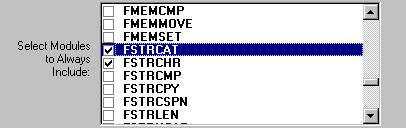
Just enable the modules you want to include in any case into your target application.
ProductsDevelopment Tools |
Hardware & Collateral |
Downloads |
Support |
Contact |
 |
||||