|
||
| Products Download Events Support Videos | ||

Product Information
Device Database®
Downloads
Compliance Testing
Distributors
Peripheral Simulation
For NXP (founded by Philips) LPC1766 — GPIO Interrupts Ports 0, 2
Simulation support for this peripheral or feature is comprised of:
- Dialog boxes which display and allow you to change peripheral configuration.
These simulation capabilities are described below.
General Purpose Input/Output (GPIO) Interrupts Dialog
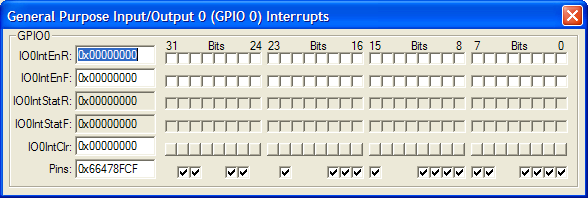
The General Purpose Input/Output 0 (GPIO 0) Interrupts Dialog controls the direction of the general purpose port 0 pins. You may use the following controls to select and configure the external interrupt settings.
GPIO0 Group
- IO0IntEnR (Input Output Interrupt Enable Register)
- IO0IntEnF (Input Output Interrupt Enable Register)
- IO0IntStatF (Input Output Interrupt Status Clear Register)
- IO0IntStatR (Input Output Status Register)
- IO0IntClr (Input Output Interrupt Clear Register)
- Pins is used to manually control a pin value.
General Purpose Input/Output (GPIO) Interrupts Dialog
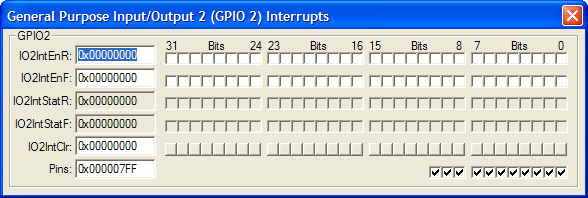
The General Purpose Input/Output 2 (GPIO 2) Interrupts Dialog controls the GPIO interrupts of the general purpose port 2. You may use the following controls to select and configure the external interrupt settings.
GPIO2 Group
- IO2IntEnR (Input Output Interrupt Enable Register)
- IO2IntEnF (Input Output Interrupt Enable Register)
- IO2IntStatF (Input Output Interrupt Status Clear Register)
- IO2IntStatR (Input Output Status Register)
- IO2IntClr (Input Output Interrupt Clear Register)
- Pins is used to manually control a pin value.
ProductsDevelopment Tools |
Hardware & Collateral |
Downloads |
Support |
Contact |
 |
||||