|
||
| Products Download Events Support Videos | ||

Product Information
Device Database®
Downloads
Compliance Testing
Distributors
Peripheral Simulation
For Atmel AT91SAM9263 — Controller Area Network (CAN)
Simulation support for this peripheral or feature is comprised of:
- Dialog boxes which display and allow you to change peripheral configuration.
These simulation capabilities are described below.
CAN 0 Communication Dialog

The Controller Area Network (CAN) Communication Dialog displays the CAN communication activity on the CAN bus. The message Number, States, Channel #, Message Identifiers, Message Direction, Data Length and Data content are displayed for each message. To clear the message display, double-click anywhere in the message display area.
CAN 0 Controller Dialog
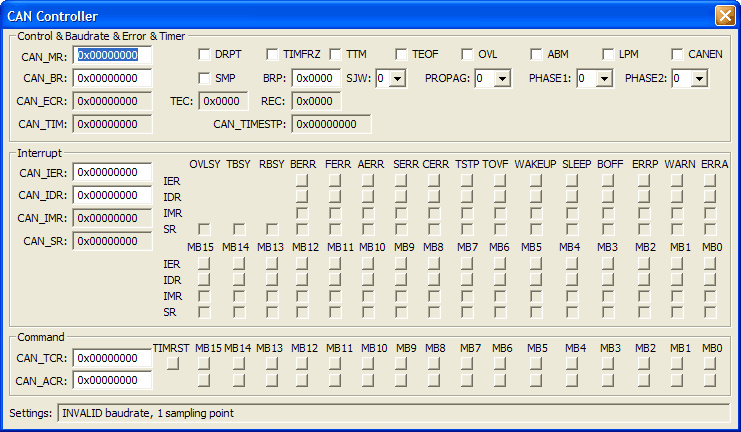
The Controller Area Network (CAN) Controller dialog configures on-chip CAN Controller n. Each CAN controller provides storage for up to 15 message objects which can be a maximum of 8 bytes long.
Control & Baudrate & Error & Timer Group
- CAN_MD (Mode Register) controls the basic operating mode of the CAN controller and contains the following control bits:
- DRPT (Disable Repeat) is set to abort the data transfer request when bus arbitration is lost.
- TIMFRZ (Enable Timer Freeze) is set to make the internal timer stop when it reaches 0xFFFF.
- TTM (Disable/Enable Time Triggered Mode) is set to enable Time Triggered mode.
- TEOF (Timestamp at End of Frame) is set to capture the timestamp at the end of the frame. If reset, the timestamp is captured at the start of the frame.
- OVL (Overload Frame) is set to generate an overload frame after a message is received successfully.
- ABM (Autobaud/Listen Mode) is set to enable the Autobaud/Listen mode.
- LPM (Low Power Mode) is set set the CAN controller in Low Power mode after transmitting all pending messages.
- CANEN (CAN Controller Enable) is set to enable the CAN controller.
- CAN_BR (CAN Baudrate Register) controls the baudrate used for CAN communications and contains the following control bits:
- SMP (Sampling Mode) is set to sample the incoming bit stream 3 times using MCK as a clock period.
- BRP (Baudrate Prescaler) this value plus one is divided by MCK to produce the CAN system clock rate.
- SJW (Synchronization Jump Width) compensates for phase shift differences between CAN controllers on the bus. This value defines the maximum number of clock cycles a bit period may be adjusted during re-synchronization.
- PROPAG (Programming Time Segment) compenstaes for network delay timing.
- PHASE1 (Phase 1 Segment) compensates for edge phase error.
- PHASE2 (Phase 2 Segment) compensates for edge phase error.
- CAN_ECR (CAN Error Counter Register) contains the counts of receive and transmit errors.
- TEC (Transmit Error Counter) displays the number of transmit errors.
- REC (Receive Error Counter) displays the number of receive errors.
- CAN_TIM (CAN Timer Register) contains the current value of the CAN internal timer.
- CAN_TIMSTP (CAN Timestamp Register) contains the internal timer value at the start or end of frame, depending on the TEOF bit in CAN_MR.
Interrupt Group
- CAN_IER (CAN Interrupt Enable Register) contains CAN Interrupt Enable bits. Setting a bit enables an interrupt.
- CAN_IDR (CAN Interrupt Disable Register) contains CAN Interrupt disable bits. Setting a bit disables an interrupt.
- CAN_IMR (CAN Interrupt Mask Register) contains CAN Interrupt mask bits. Setting a bit prevents an interrupt from occurring.
- CAN_SR (CAN Status Register) when a CAN event occurs, this register contains the event and the mailbox which triggered the event.
Command Group
- CAN_TCR (CAN Transfer Command Register) initiates a transfer request for 1 or more mailboxes.
- TIMRST (CAN Timer Reset) is set to reset the CAN internal timer.
- CAN_ACR (CAN Abort Command Register) initiates abort requests for 1 or more mailboxes.
CAN 0 Mailbox Dialog
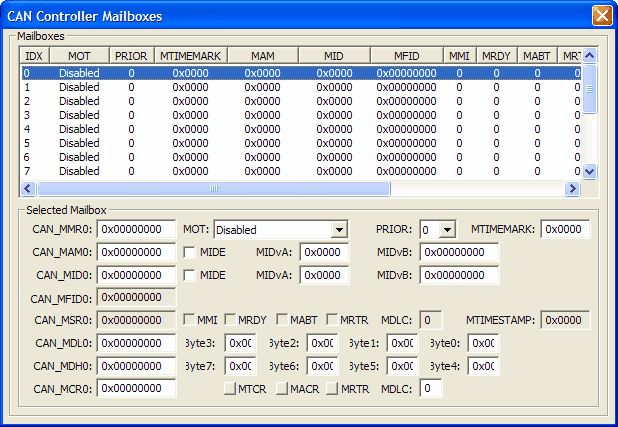
The CAN Controller Mailbox dialog displays the status of the 8 mailboxes (sometimes called channels or buffers) supported by this device.
Selected Mailbox Group
- CAN_MMRn (CAN Message Mode n Register) contains the following control settings:
- MOT (Mailbox Object Type) selects the mailbox type.
- PRIOR (Mailbox Priority) selects the mailbox priority for transmitting data. This is not used when receiving data.
- MTIMEMARK (Mailbox Timemark) when using Time-Triggered Mode, tranmission is allowed when the internal CAn timer reaches this value.
- CAN_MAMn (CAN Message Acceptance Mask n Register) contains the following control settings:
- MIDE (Identifier Version) is set to accept both standard and extended frame identifiers. If reset, only standard identifiers are accepted.
- MIDvA (Standard Frame Identifier) contains the accceptance mask for standard frames.
- MIDvB (Extended Frame Identifier) contains the accceptance mask for extended frames.
- CAN_MIDn (CAN Message ID n Register) contains the following settings:
- MIDE (Identifier Version) is set to for Version 2.0, Part B (extended) message frames. If reset, Version 2.0, Part A (standard)message frames are sent and recognized.
- MIDvA (Standard Frame Identifier) contains the identifier for standard frames.
- MIDvB (Extended Frame Identifier) contains the identifier for extended frames.
- CAN_MFIDn (CAN Message Family ID n Register) contains the result of masking the CAN_MIDn and the CAN_MAMn registers.
- CAN_MSRn (CAN Status n Register) contains the following status information:
- MMI (Mailbox Message Ignored) is set when at least 1 mail message was ignored.
- MRDY (Mailbox Ready) is set when the mailbox registers may be written or read.
- MABT (Mailbox Message Abort) is set when the previous message was aborted.
- MRTR (Mailbox Remote Transmission Request) is set to indicate another device on the CAN bus wants to sends a message to this device.
- MDLC (Mailbox Data length Code) contains the length of the mailbox message received.
- CAN_MDLn (CAN Message Data Low Value n) contains the lower 4 bytes of the message data.
- CAN_MDHn (CAN Message Data High Value n) contains the upper 4 bytes of the message data.
- CAN_MCRn (CAN Message Control Register n) contains the following control information:
- MTCR (Mailbox Transfer Command) starts transmission of one or mmore mailboxes, based on the PRIOR setting.
- MACR (Mailbox Abort Request) cancel a transfer request a mailbox if it has not been transmitted.
- MRTR (Mailbox Remote Transmission Request) sets the RTR bit in the sent frame.
- MDLC (Mailbox Data length Code) contains the length of the mailbox message to be sent.
ProductsDevelopment Tools |
Hardware & Collateral |
Downloads |
Support |
Contact |
 |
||||