|
||
| Products Download Events Support Videos | ||

Product Information
Device Database®
Downloads
Compliance Testing
Distributors
Peripheral Simulation
For Atmel AT91SAM7XC128 — Periodic Interval Timer
Simulation support for this peripheral or feature is comprised of:
- Dialog boxes which display and allow you to change peripheral configuration.
These simulation capabilities are described below.
Periodic Interval Timer Dialog
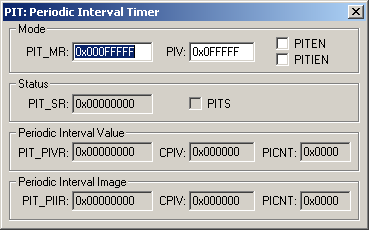
The Periodic Interval Timer Dialog shows the current state of the on-chip Periodic Interval Timer. You can change Periodic Interval Timer settings using the controls in this dialog.
Mode
- PIT_MR (Mode Register) holds the parameters that control the timer. They are:
- PIV (Periodic Interval Value) holds the value compared with the primary Periodic Interval Timer.
- PITEN (Periodic Interval Timer Enabled) is set when the Periodic Interval Timer is enabled.
- PITIEN (Periodic Interval Timer Interrupt Enable) triggers a Periodic Interval Timer interrupt.
Status
- PIT_SR (Status Register) holds the PITS value.
- PITS (Periodic Interval Timer Status) is set the Periodic Interval Timer has reached the PIV since the last read of RTT_SR.
Periodic Interval Value
- PIT_PIVR (Value Register) holds the CPIV and the PICNT value.
- CPIV (Current Periodic Interval Value) displays the current Periodic Interval Timer value.
- PICNT (Periodic Interval Counter) displays the number of occurrences of periodic intervals since the last read of PIT_PIVR.
Periodic Interval Image
- PIT_PIIR (Image Register) holds the CPIV and the PICNT value.
- CPIV (Current Periodic Interval Value) displays the current Periodic Interval Timer value.
- PICNT (Periodic Interval Counter) displays the number of occurrences of periodic intervals since the last read of PIT_PIVR.
ProductsDevelopment Tools |
Hardware & Collateral |
Downloads |
Support |
Contact |
 |
||||