|
||
| Products Download Events Support Videos | ||

Product Information
Device Database®
Downloads
Compliance Testing
Distributors
Peripheral Simulation
For Infineon XC164SM-4F — Timer Block GPT2 (T5, T6)
Simulation support for this peripheral or feature is comprised of:
- Dialog boxes which display and allow you to change peripheral configuration.
These simulation capabilities are described below.
Timer/Counter 5 Dialog
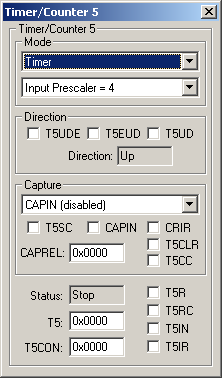
The Timer/Counter 5 dialog allows you to view and change the SFRs associated with Timer/Counter 5. This timer/counter is a general purpose unit which may be used for timing, counting, and so on.
- Mode contains the operating mode and the input selector for the timer.
Direction
- T5UDE (External Up/Down Enable) is set to let T5EUD control direction.
- T5EUD (External Up/Down Control Input) when T5UDE is set, this external input controls the count direction.
- T5UD is the timer up/down control. It can also reverse the count direction selected in T5EUD, when T5UDE is set.
- Direction displays whether the timer/counter counts up or down.
Capture
- Capture (Input Edge Selection) selects the pin and signal transition that determines how a capture event is triggered.
- T5SC (Timer 5 Capture Mode Enable) is set to allow capture mode for Timer 5.
- CAPIN is input pin used for triggering a capture event.
- CAPREL (Capture/Reload Register) contains the capture/reload value.
- CRIR (Capture Interrupt Request Flag) is set when a capture event occurs.
- T5CLR (Timer 5 Clear Enable Bit) is set to clear Timer 5 when a capture event occurs.
- T5CC (Timer 5 Capture Correction) is set to decrement Timer 5 prior to the capture event.
Status
- Status displays the current status of the timer.
- T5 contains the value of the T5 SFR which is the current timer value or count.
- T5CON contains the value of the T5CON SFR which is the current configuration for Timer 5.
- T5R (Timer 5 Run Flag) is set when Timer 5 is running.
- T5RC (Timer 5 Remote Control) is set to control Timer 5 from The Timer 6 run flag (T6R) instead of T5R.
- T5IN is the Timer 5 External Input pin.
- T5IR (Timer 5 Interrupt Request Flag) is set when the Timer 5 overflows.
Timer/Counter 6 Dialog
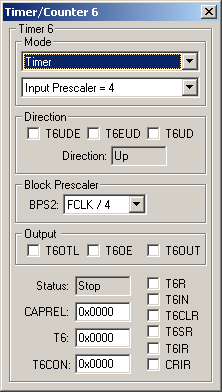
The Timer/Counter 6 dialog allows you to view and change the SFRs associated with Timer/Counter 6. This timer/counter is a general purpose unit which may be used for timing, counting, and so on.
- Mode contains the operating mode and the input selector for the timer.
Direction
- T6UDE (External Up/Down Enable) is set to let T6EUD control direction.
- T6EUD (External Up/Down Control Input) when T6UDE is set, this external input controls the count direction.
- T6UD is the timer up/down control. It can also reverse the count direction selected in T6EUD, when T6UDE is set.
- Direction displays whether the timer/counter counts up or down.
Block Prescaler
- BPS2 (Block Prescaler Control) selects the clock divider (2, 4, 8 or 16) for the general purpose core timer(GPT2).
Output
- T6OTL (Overflow Toggle Latch) toggles when Timer 6 overflows or underflows.
- T6OE (Overflow/Underflow Output Enable) is set to output the state of the Timer 6 toggle latch (T6OTL) on output pin T6OUT.
- T6OUT (Timer 6 Output Pin) contains the state of the the Timer 6 output pin.
Status
- Status displays the current status of the timer.
- CAPREL (Capture/Reload Register) contains the capture/reload value.
- T6 contains the value of the T6 SFR which is the current timer value or count.
- T6CON contains the value of the T6CON SFR which is the current configuration for Timer 6.
- T6R (Timer 6 Run Flag) is set when Timer 6 is running.
- T6IN is the Timer 6 External Input pin.
- T6CLR (Timer 6 Clear Enable Bit) is set to clear Timer 6 when a capture event occurs.
- T6IR (Timer 6 Interrupt Request Flag) is set when the Timer 3 overflows.
- T6SR (Timer 6 Reload Mode Enable) is set to allow capture/reload mode for Timer 6.
- CRIR (Capture Interrupt Request Flag) is set when a capture event occurs.
ProductsDevelopment Tools |
Hardware & Collateral |
Downloads |
Support |
Contact |
 |
||||