|
||
| Products Download Events Support Videos | ||

Product Information
Device Database®
Downloads
Compliance Testing
Distributors
Peripheral Simulation
For Infineon XC164SM-4F — Capture/Compare Unit CAPCOM2 with T7 and T8 (10 I/O Pins only)
Simulation support for this peripheral or feature is comprised of:
- Dialog boxes which display and allow you to change peripheral configuration.
These simulation capabilities are described below.
CAPCOM2 Unit Dialog
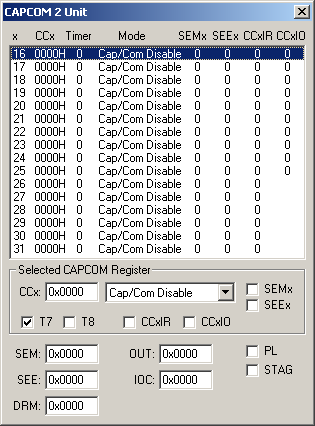
The CAPCOM 2 Unit dialog allows you to view and interactively configure the Capture/Compare Unit 2 channels. Typically, your embedded program writes values to SFRs to configure the CAPCOM Unit and the CAPCOM channels. You may use this dialog to view and confirm the CAPCOM settings.
Selected CAPCOM Register
- CCx specifies the CAPCOM register value.
- Mode specifies the compare or capture mode to use.
- SEMx (Single Event Mode Register) is set to enable single-event mode for channel x.
- SEEx (Single Event Enable Register) is set to enable single event operation for channel x.
- T7 specifies that timer 7 is used with this CAPCOM channel.
- T8 specifies that timer 8 is used with this CAPCOM channel.
- CCxIR is the interrupt request bit for the selected CAPCOM channel.
- CCxIO is the state of the I/O pin for the selected CAPCOM channel. This will be an output when the mode is configured for compare operations and an input when the mode is configured for capture operations.
CAPCOM 2 Registers
- SEM (Single Event Mode Register) contains the SEM setting for all sixteen channels.
- SEE (Single Event Enable Register) contains the SEE setting for all sixteen channels.
- DRM (Double-Register Compare Mode Register) contains the double-register selection settings for the eight double-register pairs.
- OUT (Compare Output Register) contains the result of the latched compare output of all sixteen channels. It is updated whenever a CAPCOM 2 event occurs.
- IOC (I/O Control Register) contains the staggered and port lock control setting setting for all sixteen channels.
- PL (Port Lock Control) is set to keep the output signals from setting the associated port output latch.
- STAG (Staggered Mode Control) is set when the CAPCON channel is in non-staggered mode. If reset, the CAPCON channel is in staggered mode.
Timer/Counter 7 Dialog
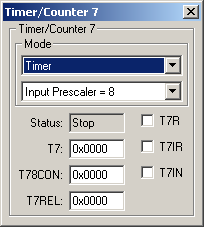
The Timer/Counter 7 dialog allows you to view and change the SFRs associated with Timer/Counter 7. This timer/counter is used to generate the time base for the Capture/Compare units of the MCU.
- Status indicates the current status of the timer.
- T7 contains the value of the T7 SFR which is the current timer value or count.
- T78CON contains the value of the T78CON SFR which is the current configuration for timer 7 and timer 8.
- T7REL contains the value of the T7REL SFR which is the reload value for timer 7.
- T7R is the Timer 7 Run flag.
- T7IR is the Timer 7 Interrupt Request flag.
- T7IN is the Timer 7 Input value.
Timer/Counter 8 Dialog
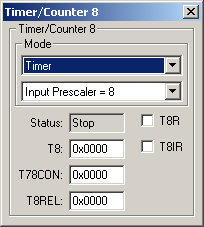
The Timer/Counter 8 dialog allows you to view and change the SFRs associated with Timer/Counter 8. This timer/counter is used to generate the time base for the Capture/Compare units of the MCU.
- Status indicates the current status of the timer.
- T8 contains the value of the T8 SFR which is the current timer value or count.
- T78CON contains the value of the T78CON SFR which is the current configuration for timer 7 and timer 8.
- T8REL contains the value of the T8REL SFR which is the reload value for timer 8.
- T8R is the Timer 8 Run flag.
- T8IR is the Timer 8 Interrupt Request flag.
- T8IN is the Timer 8 Input value.
ProductsDevelopment Tools |
Hardware & Collateral |
Downloads |
Support |
Contact |
 |
||||