|
||
| Products Download Events Support Videos | ||

Product Information
Device Database®
Downloads
Compliance Testing
Distributors
Peripheral Simulation
For Analog Devices ADuC7025 — Interrupt Controller
Simulation support for this peripheral or feature is comprised of:
- Dialog boxes which display and allow you to change peripheral configuration.
These simulation capabilities are described below.
Interrupt Controller Dialog
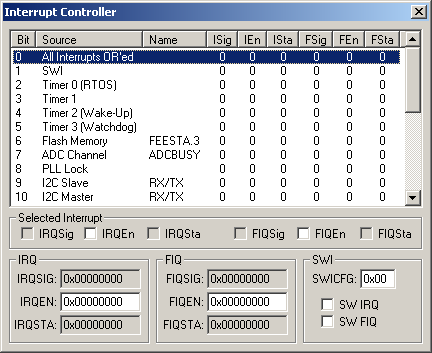
The Interrupt Controller Dialog displays the status of all simulated MCU interrupts. The source, name, channel, type, vector and interrupt state for each interrupt is displayed. You may select and configure each interrupt using the following control groups:
Selected Interrupt
The checkboxes in this group control or reflect the highlighted interrupt.
- IRQSig is set when a peripheral generates an IRQ signal. It is reset when the interrupt for that peripheral is cleared.
- IRQEn enables an interrupt when set and disables (or masks) an interrrupt when cleared.
- IRQSta is set to indicate that an interrupt source should generate an IRQ request to the ARM7 core.
- FIQSig is set when a peripheral generates an fast IRQ signal. It is reset when the interrupt for that peripheral is cleared.
- FIQEn enables an fast interrupt when set and disables (or masks) a fast interrrupt when cleared.
- FIQSta is set to indicate that a fast interrupt source should generate an fast IRQ request to the ARM7 core.
IRQ
- IRQSIG displays the interrupt (IRQSig) status for all peripherals.
- IRQEN contains the mask bits (IRQEn) for each interrupt.
- IRQSTA displays the state of enabled IRQ interrupts.
FIQ
- FIQSIG displays the fast interrupt (FIQSig) status for all peripherals.
- FIQEN contains the mask bits (FIQEn) for each fast interrupt.
- FIQSTA displays the state of enabled FIQ interrupts.
SWI
- SWICFG (Software Interrupt Control) contains the SW IRQ and SW FIQ bit settings.
- SW IRQ is set to select normal (IRQ) interrupts.
- SW FIQ is set to select fast (FIQ) interrupts.
ProductsDevelopment Tools |
Hardware & Collateral |
Downloads |
Support |
Contact |
 |
||||