|
||
| Products Download Events Support Videos | ||

Product Information
Device Database®
Downloads
Compliance Testing
Distributors
Peripheral Simulation
For Texas Instruments MSC1212Y5 — Watchdog Timer
Simulation support for this peripheral or feature is comprised of:
- Dialog boxes which display and allow you to change peripheral configuration.
These simulation capabilities are described below.
Watchdog Timer Dialog
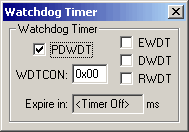
The Watchdog Timer dialog shows the current state of the on-chip Watchdog Timer. You can change watchdog settings using the controls in this dialog.
Watchdog Timer
- PDWDT (Power-Down Watchdog Timer Control) is set to put the Watchdog Timer in power down mode.
- WDTCON (Watchdog Timer Control Register) contains the current watchdog timer control bit settings:
- EWDT (Enable Watchdog Timer) is set to allow the Watchdog Timer to reset itself.
- RWDT (Reset Watchdog Timer) is set to reset the Watchdog Timer timeout count.
- DWDT (Disable Watchdog Timer) is set to disable Watchdog Timer activity.
- Expire in holds the number of milliseconds before the Watchdog Timer times out.
ProductsDevelopment Tools |
Hardware & Collateral |
Downloads |
Support |
Contact |
 |
||||