|
||
| Products Download Events Support Videos | ||

Product Information
Device Database®
Downloads
Compliance Testing
Distributors
Peripheral Simulation
For NXP (founded by Philips) P89LPC931 — Analog Comparator
Simulation support for this peripheral or feature is comprised of:
- Dialog boxes which display and allow you to change peripheral configuration.
- VTREGs (Virtual Target Registers) which support I/O with the peripheral.
These simulation capabilities are described below.
Analog Comparator Dialog
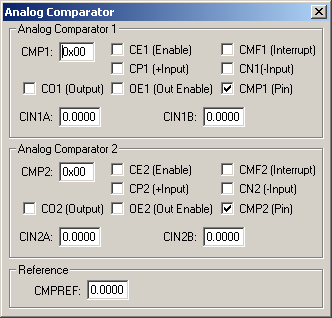
The Analog Comparator Dialog controls simulation of the two voltage comparators in the device. When enabled, it allows the user to compare voltage sources to generate a logic-level signal to a variety of destinations. The controls in this dialog are separated into several logical groups.
Analog Comparator 1 Group
- CMP1 (Comparator 1 Control Register) contains the following control bit settings:
- CE1 (Comparator 1 Enable) is set to enable comparator 1.
- CMF1 (Comparator 1 Interrupt Flag) is set by the hardware when the comparator output changes state. This triggers the Comparator 1 interrupt, if enabled.
- CP1 (Comparator Positive Input Select) is set to select CIN1B as the positive comparator input. If reset, CIN1A is selected.
- CN1 (Comparator Negative Input Select) is set to select CMPREF as the negative comparator input.
- CO1 (Comparator 1 Output) is the output level of the comparator when the comparator is enabled.
- OE1 (Comparator 1 Output Enable) is set to connect the comparator output to the CMP1 pin.
- CMP1 Pin (Comparator 1 Output Pin) reflects the state of the output pin for Comparator 1.
- CIN1A (Comparator Positive Input A) is the positive input voltage A to Comparator 1. This is a shared pin at P0.4.
- CIN1B (Comparator Positive Input B) is the positive input voltage B to Comparator 1. This is a shared pin at P0.3.
Analog Comparator 2 Group
- CMP2 (Comparator 2 Control Register) contains the following control bit settings:
- CE2 (Comparator 2 Enable) is set to enable comparator 2.
- CMF2 (Comparator 2 Interrupt Flag) is set by the hardware when the comparator output changes state. This triggers the Comparator 2 interrupt, if enabled.
- CP2 (Comparator Positive Input Select) is set to select CIN2B as the positive comparator input. If reset, CIN2A is selected.
- CN2 (Comparator Negative Input Select) is set to select CMPREF as the negative comparator input.
- CO2 (Comparator 2 Output) is the output level of the comparator when the comparator is enabled.
- OE2 (Comparator 2 Output Enable) is set to connect the comparator output to the CMP2 pin.
- CMP2 Pin (Comparator 2 Output Pin) reflects the state of the output pin for Comparator 2.
- CIN2A (Comparator Positive Input A) is the positive input voltage A to Comparator 2. This is a shared pin at P0.2.
- CIN2B (Comparator Positive Input B) is the positive input voltage B to Comparator 2. This is a shared pin at P0.1.
Reference Group
- CMPREF (Comparator Reference Pin) contains the voltage reference at pin P0.5.
CINxx VTREG
Data Type: float
CMPREF VTREG
Data Type: float
ProductsDevelopment Tools |
Hardware & Collateral |
Downloads |
Support |
Contact |
 |
||||