|
||
| Products Download Events Support Videos | ||

Product Information
Device Database®
Downloads
Compliance Testing
Distributors
Peripheral Simulation
For NXP (founded by Philips) P87LPC761 — Port 1 (Quasi-bidirectional, Push-Pull, Input Only, Open Drain)
Simulation support for this peripheral or feature is comprised of:
- Dialog boxes which display and allow you to change peripheral configuration.
- VTREGs (Virtual Target Registers) which support I/O with the peripheral.
These simulation capabilities are described below.
Parallel Port 1 Dialog
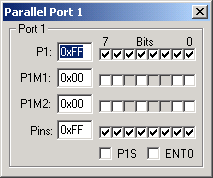
The PORT1 VTREG represents the I/O pins of Port 1 on the simulated microcontroller. You may read PORT1 to determine the state of the output pins of the port. For example, in the command window, you may type,
PORT1
to obtain value corresponding to the set pins of the port. You may also change the input values of port pins by changing the value of the VTREG. For example,
PORT1=0xF0
sets the upper four port pins to a value of 1 and the lower 4 port pins to a value of 0.
PORTx VTREG
Data Type: unsigned char
The PORTx VTREGs represent the I/O pins of the simulated MCU for Port 0, Port 1, and so on. PORT0 represents Port 0, PORT1 represents Port 1, etc. You may read PORTx to determine the state of the output pins of that port. For example, in the command window, you may type,
PORT0
to obtain value corresponding to the set pins of Port 0. You may also change the input values of port pins by changing the value of the VTREG. For example,
PORT1=0xF0
sets the upper four port pins of Port 1 to a value of 1 and the lower 4 port pins to a value of 0. You may use the bitwise operators AND(&), OR(|) and XOR(^) to change individual bits of the PORTx VTREGs. For example:
PORT1 |=  0x01;  /* Set P1.0 Pin */
PORT3 &= ~0x02;  /* Clr P3.1 Pin */
PORT1 ^=  0x80;  /* Toggle P1.7 Pin */
ProductsDevelopment Tools |
Hardware & Collateral |
Downloads |
Support |
Contact |
 |
||||