|
||
| Products Download Events Support Videos | ||

Technical Support
On-Line Manuals
ULINKpro User's Guide
 Introduction
Hardware Description
Setup ULINKpro
Using ULINKpro
Configure Cortex-M Devices for Tracing
µVision Windows
Troubleshooting
Appendix
Introduction
Hardware Description
Setup ULINKpro
Using ULINKpro
Configure Cortex-M Devices for Tracing
µVision Windows
Troubleshooting
Appendix
Configuring the Real-Time Agent
The Real-Time Agent contains a Configuration Wizard to make it easy to compile with different features and for different hardware platforms. Access the Configuration Wizard by opening the RTA_Config.c file in µVision and clicking the Configuration Wizard tab to display the following:
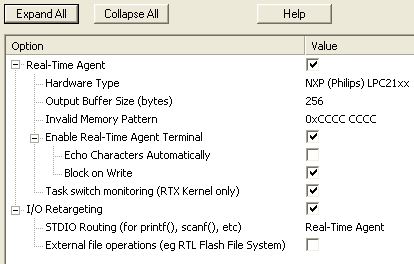
Click the Expand All button to view and select the following options:
| Option | Description |
|---|---|
| Real-Time Agent | Enables or disables the Real-Time Agent. If it is disabled, calls to it's functions are replaced by NOPs using the MDK-ARM linker __weak link functionality. |
| Hardware Type |
Select the type of hardware that you are using. This step is
required for projects not using RTX or RL-ARM. If your hardware is not available, you have 2 options:
|
| Output Buffer Size (bytes) | Size of the buffer used for Real-Time Agent data traveling from target to host. Increase this for slower JTAG connections, or if data is being lost due to buffer overruns in the target. |
| Invalid Memory Pattern | Sets the memory pattern that is returned to µVision when accessing invalid memory locations. |
| Enable Terminal Emulation | Enables or disables the terminal emulation. Disabling this option saves code and memory space when terminal emulation is not required. |
| Echo Characters Automatically | If enabled, characters typed in the Real-Time
Agent Terminal Window in µVision are automatically
echoed back. Note: Standard library functions, such as scanf(), require this option to be set. |
| Block on Write | If enabled, calling RTA_TermPutChar()
will block if there is insufficient buffer space to send the
character immediately, so terminal data will not be lost. If disabled, data will be discarded when calling RTA_TermPutChar() when there is insufficient buffer space. This improves real-time performance on the target. If terminal data is being lost when Block on Write is disabled, increasing the Output Buffer Size may solve the problem. |
| Task Switch Monitoring (RTX_Config.c) | Enables or disables RTX Kernel task switch
monitoring. Note: This option is only available for RTX or RL-ARM projects. |
| I/O Retargeting | Enables or disables I/O Retargeting. If
it is disabled, calls to printf(), scanf(), etc.
are handled using the default semihosting method, rather than
I/O Retargeting. Note: This option must be set to use the RTA macros RTA_printf() and RTA_scanf(). |
| STDIO Rerouting | Select the routing of the STDIN, STDOUT and STDERR streams (i.e. printf(), scanf(), etc.). |
| External file operations defined | If implementing a file system, you may want to
use I/O Retargeting to access that file system. In this
case, implement the functions __fopen, __fclose, __write,
__flushbuf, __read, __setfpos, __get_flen, and enable this
option. An example of this usage of I/O retargeting can be
found in C:\KEIL\ARM\RT\FlashFS\Examples\File_ex1. Note: Linking will fail if this option is enabled and the above functions are not defined. |
Note
- The 'COM Port 1' stream option in STDIO Routing expects the following functions to be defined in your code:
-
- int sendchar (int ch): Write a character to the serial port.
- int getkey (void): Get a character from the serial port (blocking).
For an example of how to use these functions for the Keil MCB21XX development boards, see C:\KEIL\ARM\RT Agent\MCB21xx\MEASURE\SERIAL.C.
Note
- I/O Retargeting requires a small amount of heap memory on the target (approximately 256 bytes). Make sure enough heap is allocated in STARTUP.S for standard library use.
ProductsDevelopment Tools |
Hardware & Collateral |
Downloads |
Support |
Contact |
 |
||||