|
||
| Products Download Events Support Videos | ||

Technical Support
Support Resources
- Support Knowledgebase
- Product Manuals
- Application Notes
- Downloads
- Product Updates
- Discussion Forum
- Books
Product Information
Simulation Use Case 2: Detecting I/O Glitches
This example project shows how you can detect glitches using the Logic Analyzer in the µVision Simulator. Glitches are an effect of I/O port settings. The increase dramatically the EMC behaviour of electronic equipment and are often hard to detect.
When using the uVision Logic Analyzer these glitches are easy to see in the Logic Analyzer Window when you select the display types:
- State: which shows a signal as a state diagram
- Bit: that shows just a single I/O pin value
Once you have detected a glitch in the Logic Analyzer Window, you need just to click on the signal name with the mouse and select the signal transions using cursor keys.
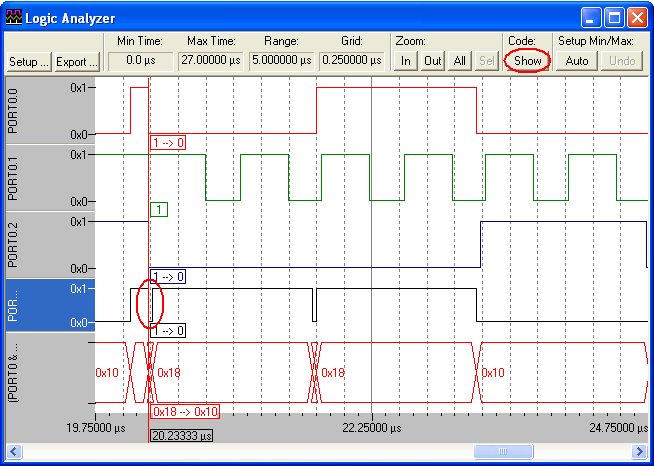
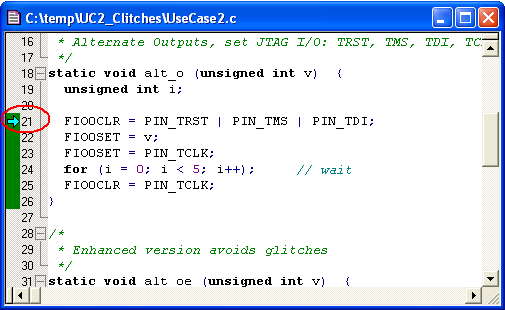
Then click Show Code to locate the source code that has generated the glitch.
UC2_CLITCHES.ZIP
(13K)
Thursday, October 5, 2006
Thursday, October 5, 2006
ProductsDevelopment Tools |
Hardware & Collateral |
Downloads |
Support |
Contact |
 |
||||