|
||
| Products Download Events Support Videos | ||

Product Information
Device Database®
Downloads
Compliance Testing
Distributors
Peripheral Simulation
For Infineon XC2764X-32F — PEC
Simulation support for this peripheral or feature is comprised of:
- Dialog boxes which display and allow you to change peripheral configuration.
These simulation capabilities are described below.
PEC Channels Dialog
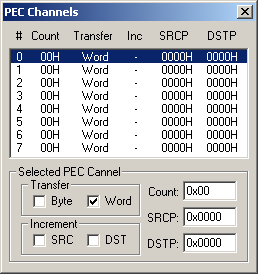
The PEC (Peripheral Event Controller) Channels dialog shows the status of all PEC transfers. The configuration of each PEC is displayed and may be changed using the appropriate control.
- Transfer specifies whether Bytes or Words are transfered for each PEC interrupt.
- Increment specifies whether the source pointer and/or the destination pointer increment after each transfer.
- Count specifies the number of transfers to make.
- SRCP specifies the source address (in the first 64K).
- DSTP specifies the destination address (in the first 64K).
ProductsDevelopment Tools |
Hardware & Collateral |
Downloads |
Support |
Contact |
 |
||||