|
||
| Products Download Events Support Videos | ||

Product Information
Device Database®
Downloads
Compliance Testing
Distributors
Peripheral Simulation
For NXP (founded by Philips) LPC1765 — Real Time Clock
Simulation support for this peripheral or feature is comprised of:
- Dialog boxes which display and allow you to change peripheral configuration.
These simulation capabilities are described below.
Real-time Clock Dialog
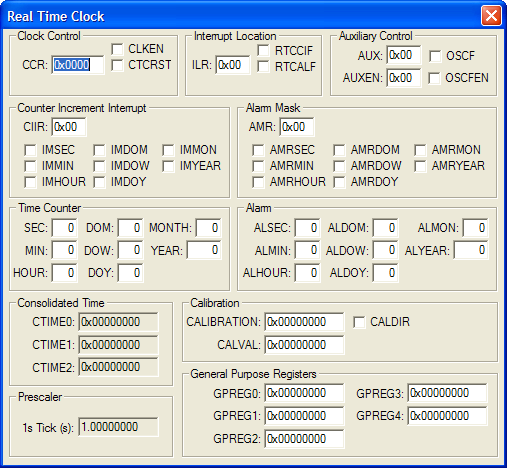
The Pin Connect Block Dialog allow the user to configure pins P0.0 - P0.31 of the MCU based on functions required. Selecting a pin allows you to change the
The Real Time Clock Dialog shows the current state of the on-chip real-time clock (RTC). You can change the RTC settings using the controls in this dialog.
Clock Control
- CCR (Clock Control Register) holds the following settings:
- CLKEN (Clock Enable) is set to enable one of the time counters. This bit must be reset to initialize a time counter.
- CTCRST (Clock Tick Count Reset) is set to hold the Clock Tick Counter in a reset condition.
Clock Tick Counter
- CTC (Clock Tick Counter) contains the current value of the clock tick counter. 32,768 ticks of this clock equals 1 second.
Interrupt Location
- ILR (Interrupt Location Register) holds the following settings:
- RTCCIF ()
- RTCALF ()
Counter Increment Interrupt
- CIIR (Counter Increment Interrupt Register) holds the control bits for generating an interrupt when a specific counter is incremented. The following control bits are supported:
- IMSEC is set to generate an interrupt when the Second value increments.
- IMMIN is set to generate an interrupt when the Minute value increments.
- IMHOUR is set to generate an interrupt when the Hour value increments.
- IMDOM is set to generate an interrupt when the Day of Month value increments.
- IMDOW is set to generate an interrupt when the Day of Week value increments.
- IMDOY is set to generate an interrupt when the Day of Year value increments.
- IMMON is set to generate an interrupt when the Month value increments.
- IMYEAR is set to generate an interrupt when the Year value increments.
Alarm Mask
- AMR (Alarm Mask Register) allows you to disable the alarms function for the following time counters:
- AMRSEC is set to disable the Second alarm (ALSEC).
- AMRMIN is set to disable the Minute alarm (ALMIN).
- AMRHOUR is set to disable the Hour alarm (ALHOUR).
- AMRDOM is set to disable the Day of Month alarm (ALDOM).
- AMRDOW is set to disable the Day of Week alarm (ALDOW).
- AMRDOY is set to disable the Day of Year alarm (ALDOY).
- AMRMON is set to disable the Month alarm (ALMON).
- AMRYEAR is set to disable the Year alarm (ALYEAR).
Time Counter
- SEC displays the current second (0-59).
- MIN displays the current minute (0-59).
- HOUR displays the current hour (0-23).
- DOM displays the current day of the month. This value will be 1-28, 29, 30 or 31 depending on the month and leap year.
- DOW displays the current day of the week (0-6).
- DOY displays the current day of the year (1-365 or 1-366 for a leap year).
- MONTH displays the current month (1-12).
- YEAR displays the current year (0-4095).
Alarm This group contains the alarm values for triggering alarm interrupts. The alarm mask bits (AMR) must be reset for an alarm interrupt to occur.
- ALSEC is the Seconds alarm value.
- ALMIN is the Minutes alarm value.
- ALHOUR is the Hour alarm value.
- ALDOM is the Day of Month alarm value.
- ALDOW is the Day of Week alarm value.
- ALDOY is the Day of Year alarm value.
- ALMONTH is the Month alarm value.
- ALYEAR is the Year alarm value.
Consolidated Time
- CTIME0 (Consolidated Time Register 0) contains the current value of the Seconds (SEC), Minutes (MIN), Hours (HOUR) and Day of Week (DOW) time counters.
- CTIME1 (Consolidated Time Register 1) contains the current value of the Day of Month (DOM), Month (MON) and Year (YEAR) time counters.
- CTIME2 (Consolidated Time Register 2) contains the current value of the Day of Year (DOY) time counter.
Prescaler
- PREINT contains the integer portion of the Prescale Value. This value equals int(PCLK / 32768) - 1.
- PREFRAC contains the fractional portion of the Prescale value. This value equals PCLK - ((PREINT+ 1) x 32768)
- 1s Tick (s) displays the resulting number of 1-second ticks for the Prescaler using the PREINT and PREFRAC values.
function for that pin.
Selected Pin
- P0.x (Pin Name) lists the function choices available for the selected pin.
Pin Select
- PINSELx (Pin Selection Registers 0-1) contain the composite bit settings for the 32 Port 0 bits.
Open Drain Mode Control
- PINMODE_ODx (Pin Open Drain Mode Registers) contain the bit settings for those pins configured to open drain mode (pin=1).
ProductsDevelopment Tools |
Hardware & Collateral |
Downloads |
Support |
Contact |
 |
||||