|
||
| Products Download Events Support Videos | ||

Product Information
Device Database®
Downloads
Compliance Testing
Distributors
Peripheral Simulation
For Infineon XC2285-56F — Traps
Simulation support for this peripheral or feature is comprised of:
- Dialog boxes which display and allow you to change peripheral configuration.
- VTREGs (Virtual Target Registers) which support I/O with the peripheral.
These simulation capabilities are described below.
Hardware Traps Dialog
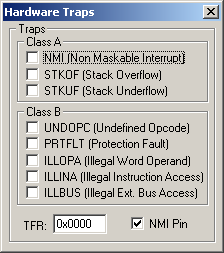
The Hardware Traps dialog shows the state of all MCU hardware traps. You may select the checkbox of the desired condition to generate a trap.
NMIPIN VTREG
Data Type: unsigned char
THE NMIPIN VTREG contains the state of the NMI pin on the simulated MCU. Normally, the NMI pin is high (indicating that there is no non-maskable interrupt condition). NMI goes low to signal a non-maskable interrupt. Enter the following in the Command window to trigger an NMI Trap using the NMIPIN VTREG.
NMIPIN=0
Enter the following to return the NMI pin to a high level.
NMIPIN=1
Note that on some devices the NMI pin must be low to enter Power Down Mode.
ProductsDevelopment Tools |
Hardware & Collateral |
Downloads |
Support |
Contact |
 |
||||