|
||
| Products Download Events Support Videos | ||

Product Information
Device Database®
Downloads
Compliance Testing
Distributors
Peripheral Simulation
For NXP (founded by Philips) P89LPC954 — Keypad Interrupt
Simulation support for this peripheral or feature is comprised of:
- Dialog boxes which display and allow you to change peripheral configuration.
These simulation capabilities are described below.
Keypad Interrupt Dialog
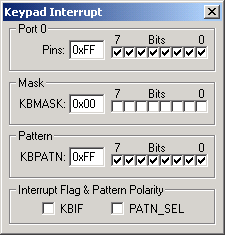
This dialog displays the SFR and pins of Keypad Interrupt (KBI) Dialog. The Keypad Interrupt function generates an interrupt when a pre-selected pattern occurs on Port 0.
Port 0
- Pins represents the states of the pins on the simulated MCU. You may set the level of the input pin to high (1) or low (0).
Mask
- KBMASK (Keypad Interrupt Mask Register) defines which pins are enabled to trigger the interrupt.
Pattern
- KBPATN (Keypad Pattern Register) defines the pattern that is compared with Port 0.
Interrupt Flag & Pattern Polarity
- KBKBIF (Keypad Interrupt Flag) is set when the pattern in the Keypad Pattern Register matches Port 0 for at least 6 CPU clock (CCLK) periods.
- PATN_SEL (Pattern Matching Polarity) is set to require Port 0 to be equal to the KBPATN value to generate an interrupt. If reset, an interrupt will be generated when Port 0 is not equal to KBPATN.
ProductsDevelopment Tools |
Hardware & Collateral |
Downloads |
Support |
Contact |
 |
||||