|
||
| Products Download Events Support Videos | ||

Product Information
Device Database®
Downloads
Compliance Testing
Distributors
Peripheral Simulation
For NXP (founded by Philips) LPC2468 — GPIO Slow Interface, Port 1: 32-Bit
Simulation support for this peripheral or feature is comprised of:
- Dialog boxes which display and allow you to change peripheral configuration.
- VTREGs (Virtual Target Registers) which support I/O with the peripheral.
These simulation capabilities are described below.
GPIO1 Slow Interface (32-bit) Dialog
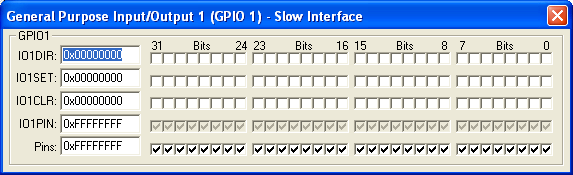
The General Purpose Input/Output (GPIO) Dialog controls the direction of the general purpose port pins. You may use the following controls to select and configure the external interrupt settings.
GPIO Group
- IOnDIR (Input Output Direction Register) contains the direction assignments for each I/O port bit. The checkboxes are checked for output and unchecked for input.
- IOnSET (Input Output Set Register) bits are checked to force a high level for a that port bit during output.
- IOnCLR (Input Output Clear Register) bits are checked to force a low level for a that port bit during output.
- IOnPIN (Input Output Pin Value Register) contains the current condition of the GPIO pins.
- Pins is used to manually control a pin value.
PORTx VTREG
Data Type: unsigned long
The PORTx VTREGs represent the I/O pins of the simulated MCU for Port A, Port B, and so on. PORTA represents Port A, PORTB represents Port B, etc. You may read PORTx to determine the state of the output pins of that port. For example, in the command window you may type,
PORTA
to obtain value corresponding to the set pins of Port A. You may also change the input values of port pins by changing the value of the VTREG. For example,
PORTA=0x000000F0
sets the upper four port pins of Port A to a value of 1 and all other port pins to a value of 0. You may use the bitwise operators AND(&), OR(|) and XOR(^) to change individual bits of the PORTx VTREGs. For example:
PORTA |=  0x00000001;  /* Set PA0 Pin */
PORTB &= ~0x00000200;  /* Clr PB9 Pin */
PORTA ^=  0x00800000;  /* Toggle PA23 Pin */
ProductsDevelopment Tools |
Hardware & Collateral |
Downloads |
Support |
Contact |
 |
||||