|
||
| Products Download Events Support Videos | ||

Product Information
Device Database®
Downloads
Compliance Testing
Distributors
Peripheral Simulation
For Silicon Laboratories, Inc. C8051F410 — D/A Converter (1x8-bit)
Simulation support for this peripheral or feature is comprised of:
- Dialog boxes which display and allow you to change peripheral configuration.
- VTREGs (Virtual Target Registers) which support I/O with the peripheral.
These simulation capabilities are described below.
Digital / Analog Converter Dialog
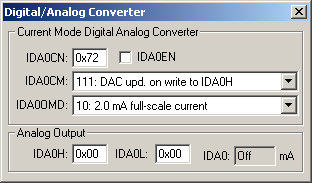
The Digital/Analog Converter dialog displays and configures simulation capabilities of the Current Mode Digital/Analog Converter. The controls in this dialog are separated into several logical groups.
Current Mode Digital/Analog Converter
- IDA0CN (DAC Control Register) displays and configures the D/A Converter Enable, Source Select and Output Mode selections.
- IDA0EN (DAC Enable) enables DAC operation.
- IDA0CM (DAC Update Source Select) determines when the DAC output value is updated, based on either a write to IDA0H, a change in level of the external CNVSTR signal or when Timer 0, 1, 2 or 3 overflows.
- IDA0MD (DAC Output Mode) selects the DAC output current level.
Analog Output
- IDAC0H (DAC Data Output - High byte) is the MSB of the DAC output word.
- IDAC0L (DAC Data Output - Low byte) is the LSB of the DAC output word.
- IDAC0 (Output Register) displays the converted analog voltage value.
DAC1 VTREG
Data Type: float
The DAC1OUT VTREG represents the analog output voltages for simulated D/A converter 1. The DAC1OUT VTREG represents the outputs from the DAC 1 output pin of the MCU.
ProductsDevelopment Tools |
Hardware & Collateral |
Downloads |
Support |
Contact |
 |
||||