|
||
| Products Download Events Support Videos | ||

Product Information
Device Database®
Downloads
Compliance Testing
Distributors
Peripheral Simulation
For Infineon XC886CLM-6FF — WatchDog
Simulation support for this peripheral or feature is comprised of:
- Dialog boxes which display and allow you to change peripheral configuration.
These simulation capabilities are described below.
Watchdog Timer Dialog
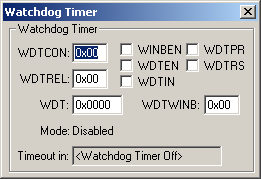
The Watchdog Timer dialog shows the current state of the on-chip Watchdog Timer. You can change watchdog settings using the controls in this dialog.
- WDTCON is the watchdog control register.
- WDTREL is the watchdog timer reload value for the upper 8-bits (WDTH) of the WDT.
- WDT is the current watchdog timer count.
- WINBEN (Window-Boundary Enable) enables the Window-Boundary feature.
- WDTEN (WDT Enable) is set to enable the Watchdog Timer.
- WDTIN (WDT Input Frequency) selects the input frequency divisor (2 or 128) for the watchdog timer clock.
- WDTPR (Prewarning Mode) selects the clock prescaler for the watchdog timer.
- WDTRS (WDT Refresh Start) is set to start the refresh operation on the WDT. Hardware resets this bit.
- WDTWINB (Window-Boundary Count) contains the lowest value the high-order 8-bits of WDT (WDTH) can contain and still allow a WDT refresh. A refresh below this value is not allowed.
- Mode indicates the current mode of the WDT.
- Timeout In indicates when the next watchdog timeout will occur.
ProductsDevelopment Tools |
Hardware & Collateral |
Downloads |
Support |
Contact |
 |
||||