|
||
| Products Download Events Support Videos | ||

Product Information
Device Database®
Downloads
Compliance Testing
Distributors
Peripheral Simulation
For NXP (founded by Philips) P89LPC9103 — Interrupts 12S/4L (Including External)
Simulation support for this peripheral or feature is comprised of:
- Dialog boxes which display and allow you to change peripheral configuration.
These simulation capabilities are described below.
Interrupt System Dialog
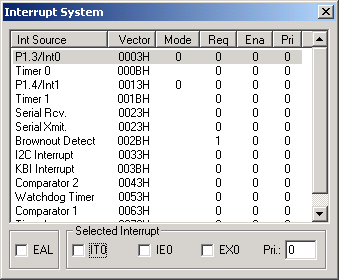
The Interrupt System dialog (available from the Peripherals menu) displays the status of all simulated MCU interrupts. The interrupt source, vector, request, interrupt and group levels, and enabled status are displayed. You may use this dialog to manually change the interrupt configuration. Select the desired interrupt and click on the desired check box to immediately effect the change. You may even trigger an interrupt by clicking on the request bit.
Selected Interrupt Group
- EA (Enable All Interrupts) is set to enable each interrupt according to its mask setting.
- IT0 (Interrupt 0 Type) is set to detect edge-triggered interrupts. It is reset to detect level-triggered interrupts.
- IE0 (External Interrupt) is set when an edge or level triggered interrupt occurs, based on IT0.
- EX0 (Enable External Interrupt 0) is set to enable requests generated by the /INT0 pin.
- Pri (Priority) sets the selected interrupt priority level.
ProductsDevelopment Tools |
Hardware & Collateral |
Downloads |
Support |
Contact |
 |
||||