|
||
| Products Download Events Support Videos | ||

Product Information
Device Database®
Downloads
Compliance Testing
Distributors
Peripheral Simulation
For NXP (founded by Philips) P89LPC925 — Watchdog Timer
Simulation support for this peripheral or feature is comprised of:
- Dialog boxes which display and allow you to change peripheral configuration.
These simulation capabilities are described below.
Watchdog Timer Dialog
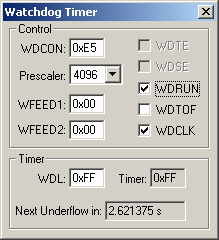
The Watchdog Timer dialog shows the current state of the on-chip Watchdog Timer. You can change watchdog settings using the controls in this dialog.
Control
- WDCON (Watchdog Timer Control Register) can only be written when followed by correct feed sequence. After writing WDCON, WFEED1 must be loaded with 0xA5 then immediately followed by loading an 0x5A in WFEED2 or the changes to WDCON will be ignored. WDCON contains the following settings:
- Prescaler (Clock Prescaler Select) is the clock divisor (from 32 to 4096) for the Watchdog Timer.
- WDRUN (Watchdog Run Control) is set to start the WDT running and reset to stop it.
- WDTOF (Watchdog Timer Time-Out Flag) is set when the 8-bit counter underflows.
- WDCLK (Watchdog Input Clock Select) selects the Watchdog Timer clock.
- WFEED1 (Watchdog Feed Register 1) is used along with WFEED2 to allow the user to write to WDL and WDCON SFR's.
- WFEED2 (Watchdog Feed Register 2) is used along with WFEED1 to allow the user to write to WDL and WDCON SFR's.
Timer
- WDL (Watch Dog Load) is the 8-bit down counter. WDL must be loaded before WDCON. WDCON must be followed by the WFEED1, WFEED2 feed sequence to write to this register.
- Timer is the stored down-counter value.
- Next Underflow in is the number of seconds until the next Watchdog Timer event occurs.
ProductsDevelopment Tools |
Hardware & Collateral |
Downloads |
Support |
Contact |
 |
||||