|
||
| Products Download Events Support Videos | ||

Product Information
Device Database®
Downloads
Compliance Testing
Distributors
Peripheral Simulation
For Analog Devices ADuC7025 — Power Supply Monitor
Simulation support for this peripheral or feature is comprised of:
- Dialog boxes which display and allow you to change peripheral configuration.
These simulation capabilities are described below.
Power Supply Monitor Dialog
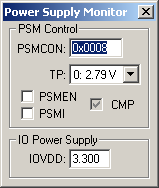
The Power Supply Monitor Dialog controls the simulation of the Power Supply Monitor feature of the ADuC7000 ARM controller. Whe enabled, this feature triggers an interrupt when a low supply voltage or brown-out condition occurs.
PSM Control Group
- PSMCON (Power Supply Monitor Control Register) contains the following control settings:
- TP (Trip Point Selection) is set to select a trip point of 3.07 volts. If reset, a trip point of 2.79 volts is used.
- PSMEN (Power Supply Monitor Enable) is set to enable the Power Supply Monitor feature.
- PSMI (Power Supply Monitor Interrupt) is set when the comparator (CMP) goes low, indicating a low voltage condition. It must be reset by software.
- CMP (Comparator) is set to indicate that IOVDD is above the selected trip point (TP).
- IOVDD (GPIO Voltage) is the simulated 3.3V supply for GPIO and input to the on-chip voltage regulator.
ProductsDevelopment Tools |
Hardware & Collateral |
Downloads |
Support |
Contact |
 |
||||