|
||
| Products Download Events Support Videos | ||

Product Information
Device Database®
Downloads
Compliance Testing
Distributors
Peripheral Simulation
For Analog Devices ADuC7022 — Timer 1
Simulation support for this peripheral or feature is comprised of:
- Dialog boxes which display and allow you to change peripheral configuration.
These simulation capabilities are described below.
Timer 1 Dialog
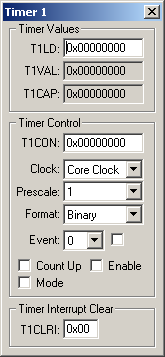
The Keil Debugger simulates all aspects of Timer 1. The configuration is reflected in the Timer 1 Dialog that you may open from the Peripherals Menu. You may use the controls in the dialog to override the settings configured by your target program. This allows you to learn how the timer works by interactively changing the configuration settings.
Timer Values Group
- T1LD (Timer 1 Load Register) contains the 16-bit value to be re-loaded into the timer when is reaches zero.
- T1VAL (Timer 1 Value Register) current timer value.
- T1CAP (Timer 1 Capture Register) hold the Timer 1 capture value.
Timer Control Group
- T1CON (Timer 1 Control Register) is used to start and control Timer 1.
- Clock selects the clock to use for Timer 1 control.
- Prescale contains the value used to scale the clock frequency (1, 16, 256 or 32768).
- Format (Timer 1 Format) selects the format of the counter. It can be in either binary or hh:mm:ss:uu formats.
- Event (Timer 1 Event Selection) The event number to capture from 0 to 31. The checkbox is set to enable the capture of the selected event.
- Count Up is set to count up or reset to count down.
- Mode is set for periodic mode or reset for free-running mode.
- Enable (Timer 1 Enable) is set to enable Timer 1.
Timer Interrupt Clear Group
- T1CLRI (Timer 1 Interrupt Clear) is set to a non-zero value to clear the Timer 1 interrupt.
ProductsDevelopment Tools |
Hardware & Collateral |
Downloads |
Support |
Contact |
 |
||||