|
||
| Products Download Events Support Videos | ||

Product Information
Device Database®
Downloads
Compliance Testing
Distributors
Peripheral Simulation
For NXP (founded by Philips) P89LPC902 — System Configuration Byte UCFG1
Simulation support for this peripheral or feature is comprised of:
- Dialog boxes which display and allow you to change peripheral configuration.
- VTREGs (Virtual Target Registers) which support I/O with the peripheral.
These simulation capabilities are described below.
System Configuration Dialog
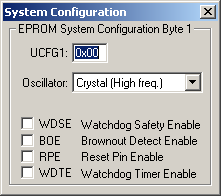
The System Configuration is simulated in the System Configuration Dialog that you may open from the Peripherals Menu. You may use the controls in the dialog to override the settings configured by your target program. This allows you to learn how the timer/counter works by interactively changing the configuration settings.
EPROM System Configuration Byte 1
- UCFG1 (Flash User Configuration Byte 1) contains the following settings:
- Oscillator (CPU Oscillator Type Select) selects the oscillator configuration the CPU will use.
- WDSE (Watchdog Safety Enable) is set to enable the Watchdog Safety which forces WDCLK to 1, allows WDCON and WDL to be written only once and WDRUN is set to 1 and cannot be cleared by software.
- BOE (Brownout Detect Enable) is set to enable the Brownout Detect feature. When enabled, if the VDD voltage is less than 2.7 volts or greater than 3.6 volts, a brownout condition occurs.
- RPE (Reset Pin Enable) is set to enable the reset function on pin P1.5.
- WDTE (Watchdog Timer Reset Enable) is set to enable the Watchdog Timer reset.
UCFG1 VTREG
Data Type: unsigned char
ProductsDevelopment Tools |
Hardware & Collateral |
Downloads |
Support |
Contact |
 |
||||