|
||
| Products Download Events Support Videos | ||

Product Information
Device Database®
Downloads
Compliance Testing
Distributors
Peripheral Simulation
For Atmel AT91M43300 — Power Management Controller
Simulation support for this peripheral or feature is comprised of:
- Dialog boxes which display and allow you to change peripheral configuration.
These simulation capabilities are described below.
Power Management Controller Dialog
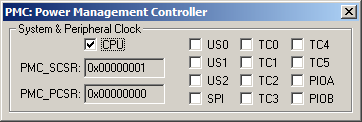
The Power Management Controller Dialog configures the power saving mode of the ARM controller by enabling and disabling the system and peripheral clocks.
System & Peripheral Clock
- The CPU box, if checked, stops the system clock, and forces the processor into Idle mode.
- PMC_SCSR (System Clock Status Register) displays the status of the CPU clock.
- PMC_PCSR (Peripheral Clock Status Register) displays the current status of the peripheral clock.
- US0 if set, enables the USART 0 clock.
- US1 if set, enables the USART 1 clock.
- US2 if set, enables the USART 2 clock.
- SPI if set, enables the Serial Peripheral Interface clock.
- TC0 if set, enables the Timer/Counter 0 clock.
- TC1 if set, enables the Timer/Counter 1 clock.
- TC2 if set, enables the Timer/Counter 2 clock.
- TC3 if set, enables the Timer/Counter 3 clock.
- TC4 if set, enables the Timer/Counter 4 clock.
- TC5 if set, enables the Timer/Counter 5 clock.
- PIOA if set, enables the parallel I/O A clock.
- PIOB if set, enables the parallel I/O B clock.
ProductsDevelopment Tools |
Hardware & Collateral |
Downloads |
Support |
Contact |
 |
||||