|
||
| Products Download Events Support Videos | ||

Product Information
Device Database®
Downloads
Compliance Testing
Distributors
Peripheral Simulation
For Atmel AT91M55800A — Digital/Analog Converter 1 (1 Channel)
Simulation support for this peripheral or feature is comprised of:
- Dialog boxes which display and allow you to change peripheral configuration.
- VTREGs (Virtual Target Registers) which support I/O with the peripheral.
These simulation capabilities are described below.
Digital/Analog Converter 1 Dialog
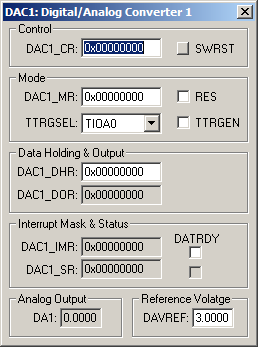
The Digital/Analog Converter 1 dialog displays and configures the D/A converter. The controls in this dialog are separated into several logical groups.
Control Group
- DAC1_CR (Control Register) displays and configures the D/A Converter control register.
- SWRST (Software Reset) button performs a softwar-triggered reset of the DAC.
Mode Group
- DAC1_CR (DAC Control Register) displays and configures the D/A Converter control register.
- RES (Resolution) transfers an 8-bit value to the convert registers, if set. 10-bit data is transferred in 16-bit format, if reset.
- TTRGSEL (Timer Trigger Selection) selects the hardware trigger source.
- TTRGEN (Timer Trigger Enable) enables data transfer synchronization using the timer trigger.
Data Holding & Output Group
- DAC1_DHR (Data Holding Register) displays the digital data to be converted.
- DAC1_DOR (Output Register) displays the digital data being converted.
Interrupt Mask & Status Group
- DAC1_IMR (Data Holding Register) holds the Data Ready for Conversion Interrupt Mask (DATRDY) setting.
- DATRDY (Data Ready for Conversion Interrupt Mask) enables the Data Ready for Conversion interrupt.
- DAC1_SR (Output Register) holds the Data Ready for Conversion (DATRDY) status.
- DATRDY (Data Ready for Conversion) is set when the Data Output Register (DAC1_DOR) receives the last data written to the Data Holding Register (DAC1_IMR).
Analog Output Group
- DA1 (Analog Output) displays the analog voltage value.
Reference Voltage
- DAVREF (Analog reference) configures the output voltage limit for DA1.
DAVREF VTREG
Data Type: float
The DAVREF VTREG sets the analog reference voltage for simulated D/A converters.
DAx VTREG
Data Type: float
The DAx VTREGs represent the analog output voltages for simulated D/A converters. If you have properly configured the analog outputs, the following commands (typed in the debugger's Command Window) display the voltages at each D/A output pin.
DA0  /* Output D/A Channel 0 value */
DA1  /* Output D/A Channel 1 value */
You may create a debugger signal function to process the voltage output on a D/A. The following signal function simulates a wire connecting D/A channel 0 to A/D channel 0. The value is copied 10 times per second.
signal void da_sig (void) {
  while (1) {
    AD0 = DA0;      /* Feed DA0 back into AD0 */
    swatch(0.1);    /* Sleep for 0.1 sec */
  }
}
ProductsDevelopment Tools |
Hardware & Collateral |
Downloads |
Support |
Contact |
 |
||||