|
||
| Products Download Events Support Videos | ||

Product Information
Device Database®
Downloads
Compliance Testing
Distributors
Peripheral Simulation
For Silicon Laboratories, Inc. C8051F125 — SMBus0 / I²C Interface
Simulation support for this peripheral or feature is comprised of:
- Dialog boxes which display and allow you to change peripheral configuration.
- VTREGs (Virtual Target Registers) which support I/O with the peripheral.
These simulation capabilities are described below.
SMBus0 Interface - Communications Dialog
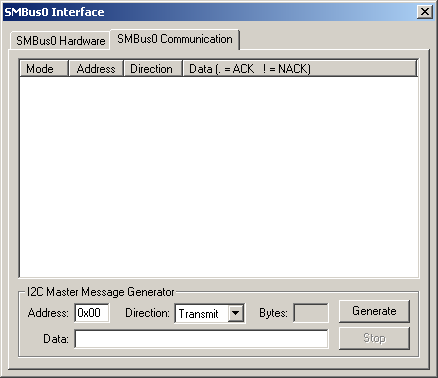
The System Management Bus 0 Communication Dialog allows you to view the data sent or received on the SMBus0.
I²C Message Generator
- Address contains address of the sending or receiving device.
- Direction selects the direction of the message to be sent or received.
- Bytes is the length of the last message in bytes.
- Data is the message data sent or received.
- Generate starts message transmission.
- Stop suspends I²C bus communication.
SMBus0 Interface - Hardware Dialog
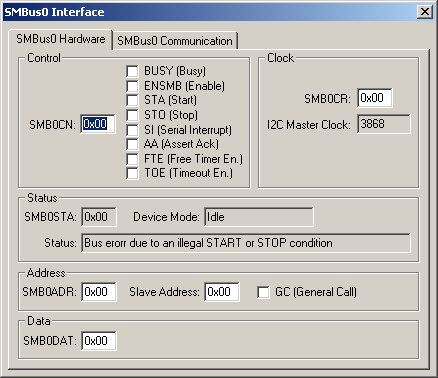
The System Management Bus 0 Interface Dialog allows you to view and edit the SMBus0 simulator configuration. The SMBus0 is compatible with the I²C serial bus. Simulation of this interface is controlled by the following groups:
Control
- SMB0CN (SMBus0 Control Register) contains the following bits that control the functions of the SMBus0:
- BUSY (Busy Status Flag) is set when the SMBus0 is busy.
- ENSMB (SMBus Enable) is set when the SMBus0 is enabled.
- STA (SMBus Start Flag) is set when the SMBus0 has started a transmission as a master.
- STO (SMBus Stop Flag) is set to send a stop condition on the SMBus.
- SI (SMBus Serial Interrupt Flag) is set to trigger a SMBus0 interrupt.
- AA (SMBus Assert Acknowledge Flag) is set to request that an acknowledge be returned during the acknowledge cycle.
- FTE (SMBus Free Timer Enable Bit) is set to timeout when SCL high time exceeds limit specified by the SMB0CR value.
- TOE (SMBus Timeout Enable Bit) is set to enable the SMBus0 timeout.
Clock
- SMB0CR (SMBus0 Clock Rate Register) controls the frequency of the serial clock SCL in master mode.
- I2C Master Clock is the master clock calculated from the system clock and the SMB0CR value.
Status
- SMB0STA (SMBus0 Status Register) contains the 8-bit status code.
- Device Mode displays the state of the SMBus0 controller.
- Status a text description of the status code.
Address
- SMB0ADR (SMBus0 Address Register) contains the following values:
- Slave Address (SMBus0 Address Register) contains the slave address of the SMBus0 interface.
- GC (General Call) is set when the general call address is recognized.
Data
- SMB0DAT (SMB0 Data Register) contains the either the data to be transmitted or the data just received.
SMB0_CLK VTREG
Data Type: unsigned long
The SMB0_CLK VTREG specifies the clock frequency (in Hz) to use in SLAVE mode. 100000 specifies 100KHz.
SMB0_IN VTREG
Data Type: unsigned int
The SMB0_IN VTREG contains data sent from an SMBus0 or I²C peripheral to the simulated MCU.
- 0x0000-0x00FF: An address or data byte transfer.
- 0x0100: START byte. This initiates a SLAVE transmit or receive. The next byte sent is the address.
- 0xFF00: ACK.
- 0xFF01: NACK.
- 0xFFFF: IDLE or STOP condition.
SMB0_OUT VTREG
Data Type: unsigned int
The SMB0_OUT VTREG contains data sent from the simulated MCU to an SMBus0 or I²C peripheral.
- 0x0000-0x00FF: An address or data byte transfer.
- 0x0100: START byte. This initiates a MASTER transmit or receive. The next byte sent is the address.
- 0xFF00: ACK.
- 0xFF01: NACK.
- 0xFFFF: IDLE or STOP condition.
ProductsDevelopment Tools |
Hardware & Collateral |
Downloads |
Support |
Contact |
 |
||||