|
||
| Products Download Events Support Videos | ||

Product Information
Device Database®
Downloads
Compliance Testing
Distributors
Peripheral Simulation
For Atmel AT91M40400 — Power Saving
Simulation support for this peripheral or feature is comprised of:
- Dialog boxes which display and allow you to change peripheral configuration.
These simulation capabilities are described below.
Power Saving Dialog
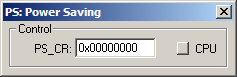
The Power Saving Dialog controls the power saving mode of the ARM controller. When the CPU button is pressed, the ARM7TDMI clock is stopped, and the processor is forced into Idle mode.
- PS_CR (Power Save Control Register) contains the CPU clock disable bit (bit 0). Setting this bit disables the CPU clock. Any interrupt or a hardware reset clears this bit.
ProductsDevelopment Tools |
Hardware & Collateral |
Downloads |
Support |
Contact |
 |
||||