|
||
| Products Download Events Support Videos | ||

Product Information
Device Database®
Downloads
Compliance Testing
Distributors
Peripheral Simulation
For Atmel AT89C4051 — Port 1
Simulation support for this peripheral or feature is comprised of:
- Dialog boxes which display and allow you to change peripheral configuration.
These simulation capabilities are described below.
Parallel Port 1 Dialog
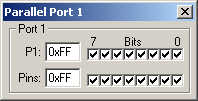
This dialog displays the SFR and pins of Port 1.
- P1: This is the P1 SFR. The HEX value and value of each bit is displayed and may be changed from this dialog.
- Pins: These are the states of the pins on the simulated MCU. When used as outputs, these have the same value as the P1 SFR. When used as inputs (P1.x is 1) you may set the level of the input pin to high (1) or low (0).
The PORT1 VTREG may be used (from the Command Window or from a user or signal function) to affect the input values of the simulated pins of Port 1.
ProductsDevelopment Tools |
Hardware & Collateral |
Downloads |
Support |
Contact |
 |
||||