|
||
| Products Download Events Support Videos | ||

Product Information
Device Database®
Downloads
Compliance Testing
Distributors
Peripheral Simulation
For Infineon C167CR-4RM — Interrupts
Simulation support for this peripheral or feature is comprised of:
- Dialog boxes which display and allow you to change peripheral configuration.
These simulation capabilities are described below.
Interrupt System Dialog
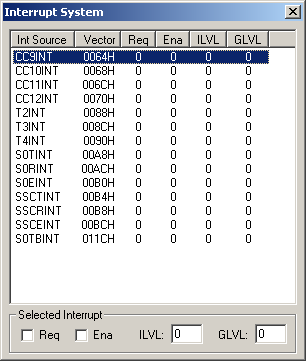
The Interrupt System dialog (available from the Peripherals menu) displays the status of all simulated MCU interrupts. The interrupt source, vector, request, interrupt and group levels, and enabled status are displayed. You may use this dialog to manually change the interrupt configuration. Select the desired interrupt and click on the desired check box to immediately effect the change. You may even trigger an interrupt by clicking on the request bit. To change the interrupt level or group level, simply type the new value in the ILVL or GLVL input boxes.
ProductsDevelopment Tools |
Hardware & Collateral |
Downloads |
Support |
Contact |
 |
||||